Deep Search Web: How to Research and Verify Sources
The most popular advice about web research is to gather more sources. That's incomplete. A longer bibliography won't rescue a claim that none of those sources supports, and a polished AI answer won't tell you which records its search never reached.
A better deep search web workflow starts with a decision you need to make, traces important claims to inspectable documents, and records what remains unknown. The aim isn't to collect the most links. It's to produce an answer someone else can check.
Table of Contents
- Deep Search Versus Standard Search at a Glance
- How to Run a Deep Search Step by Step
- Recording Queries, Sources and Gaps
- Why Deep Searches Come Back Empty
- Verifying Claims Before You Trust Them
- Checking Recall Gaps and Stopping Rules
- Protecting Sensitive Queries and Files
- Run Your First Audited Deep Search Today
Deep Search Versus Standard Search at a Glance
Deep search pays off when the answer sits somewhere ordinary search skips, such as a searchable database, a form-driven portal, or a dynamically generated results page. A crawler follows links to discover pages. If reaching a record requires entering a company name into a form, the crawler may never encounter that record.
Michael K. Bergman's 2001 paper, described by History of Information, reported BrightPlanet's historical estimate of nearly 550 billion deep-web documents, compared with roughly 1 billion indexed surface-web documents. Those estimates describe an earlier web, not today's searchable coverage. The useful distinction is between information a crawler can index and information you must retrieve another way.
Deep web doesn't mean dark web. A public database of court decisions can belong to the deep web because its records aren't exposed through crawlable pages. You may need only its search form, not specialized software.
Search methods compared by what they reach and what they miss
| Method | Reaches | Misses | Use it when |
|---|---|---|---|
| Standard web search | Pages that crawlers index through public links | Database records and content behind forms | You need quick, broad background |
| Deep search with AI | Multi-step queries, page reading and form-driven sources where supported | Anything the agent never queried or could not access | You need synthesis across many sources |
| Specialist database | Records inside one curated collection | Sources outside that collection | You need authoritative records such as filings or papers |
| Direct document review | The exact files you hold or can open | Everything else | You must confirm a claim or a contract clause |
Standard search wins for orientation and unfamiliar terminology. A specialist database wins when the collection itself establishes authority, while direct review is the right choice when the answer is already inside a file you possess.
AI deep search helps connect those activities, but its access capabilities differ by tool. Start with standard search, then move deeper when the first pass reveals that the decisive records sit inside a database or behind a form.
How to Run a Deep Search Step by Step
Treat deep search as a repeatable investigation, not an elaborate prompt. Before starting, write down what would count as an answer, such as an official decision, an original paper, or the text of a contract provision.
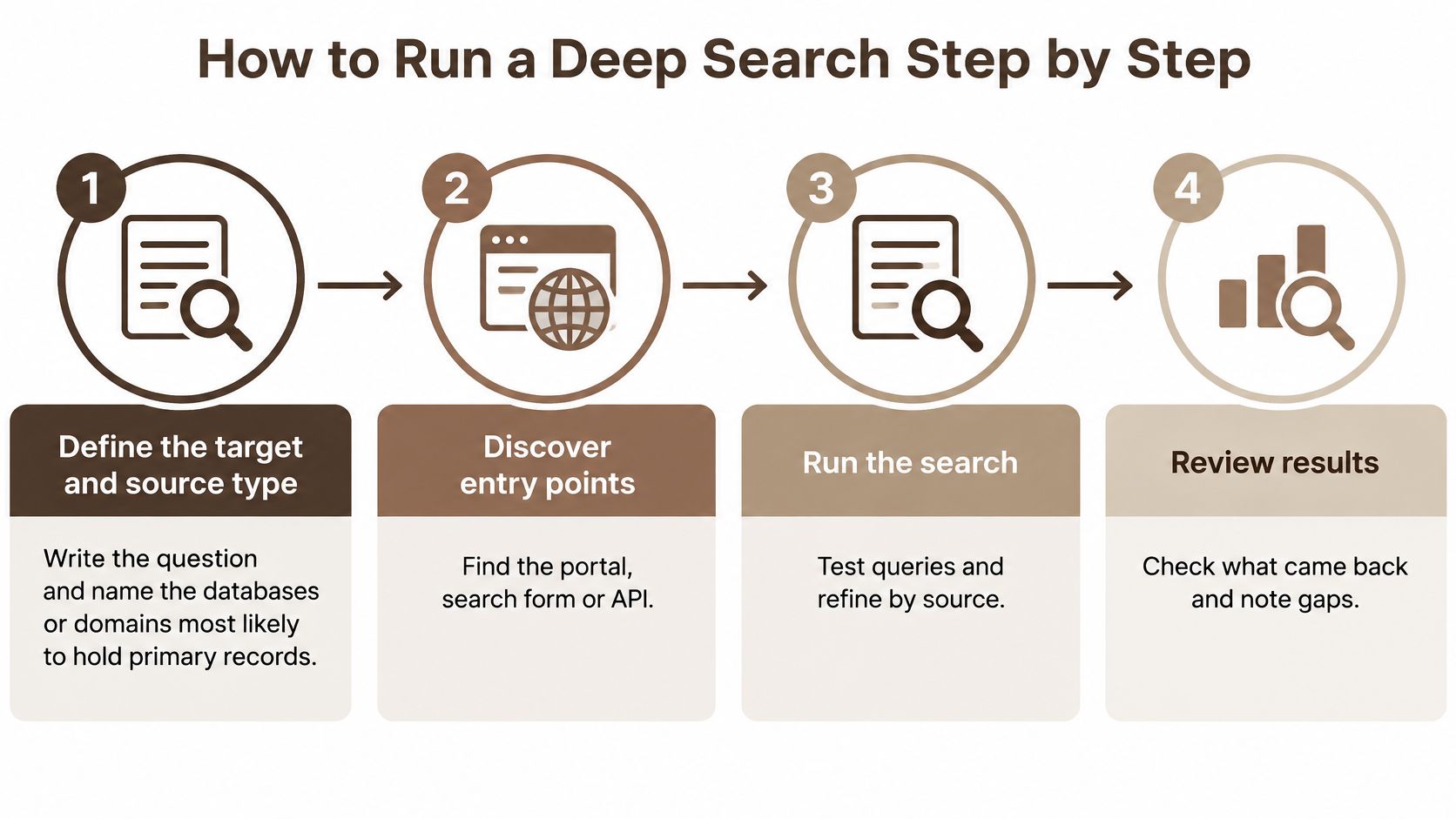
The broad process is simple enough to visualize, but each stage needs a concrete check.
Build the search before collecting results
Define the target and source type. Replace a vague question such as whether a company is trustworthy with a specific question about published enforcement decisions involving its legal entity. Name the likely primary collection before searching, and don't mistake commentary about a company for an official record.
Discover the entry points. Find the database portal, advanced search form, or API documentation rather than stopping at the organization's homepage. For locating relevant pages, Digital Footprint Check's OSINT search operator tips provide a useful companion to domain restrictions and exact-phrase searches, though operators won't grant access to restricted content.
Model the searchable fields. List the accepted names, identifiers, dates, categories, and filters, including how each field must be entered. A common slip is using the right date in a format the form rejects, or entering a trading name where the database expects a registered legal name.
Select queries for coverage. Start broadly, inspect the returned vocabulary, and add filters individually so you can see which restriction removes relevant records. Don't combine every assumption into the opening query, because an incorrect category or entity name can hide the answer.
Preserve and test what you retrieve
Submit requests and save the parameters. Record the query, selected fields, sort order, and page position, using a saved results URL when the portal supports one. Copying only the browser address is a common mistake because some forms store search settings outside the visible URL.
Deduplicate and normalize the results. Merge repeated records using stable identifiers, then standardize dates and units in your working sheet while preserving the original values. Don't merge a draft and a final decision merely because they share a title, and don't convert units without recording the conversion.
Validate against independent sources. Confirm the key record through another authoritative route, such as matching a register entry to its signed decision or an article listing to its publisher's full text. A copied press release on another website isn't independent confirmation, even if the domain is different.
Finish with a reproducibility test. Rerun the opening query with its saved settings and check that the same primary records return. If they don't, investigate whether the portal updated, the session expired, or an unrecorded filter changed before relying on the collection.
Recording Queries, Sources and Gaps
A deep search without a log is difficult to audit. You may remember finding a useful document but forget which query returned it, which filters excluded other records, or whether the archive was accessible.
An evidence ledger connects the search action to the retrieved document. Keep search activity separate from your interpretation so a colleague can distinguish what the portal returned from what you concluded.
Evidence ledger fields for every deep search
| Field | What to record | Example entry |
|---|---|---|
| Exact query | Full wording, operators and filters, copied not retyped | "Northbank Foods", enforcement decisions, all available dates |
| Database or domain | Name of the collection or site searched | A national regulator's enforcement register |
| Access date | The day you ran the search | 3 March 2026 |
| Result count | Hits returned and how many you opened | Hypothetical example, 48 hits returned, 9 opened |
| Gap note | What you could not reach and why | Login wall on a regulator's archive |
Copy the exact query, including punctuation and filter selections. Record the collection's name rather than writing web search, and add the access date because a live register can change.
The result count needs both returned hits and inspected records. Opening a selection of results doesn't justify claiming that you reviewed the entire collection.
Say a researcher checks a regulator's enforcement decisions using three phrasings. In this hypothetical search, the portal returns 48 hits, the researcher opens 9, and a login wall blocks the archive. The gap note makes the limitation actionable, showing that claims about archived decisions remain unresolved.
Practical rule: Record an access limit when you encounter it, not when you're trying to remember it while writing.
Keep the ledger in a plain spreadsheet, with document links and claim notes beside the search fields. When preparing a deliverable, a report-generation workflow can help organize the writing, but preserve the ledger as the rerunnable record behind it.
Why Deep Searches Come Back Empty
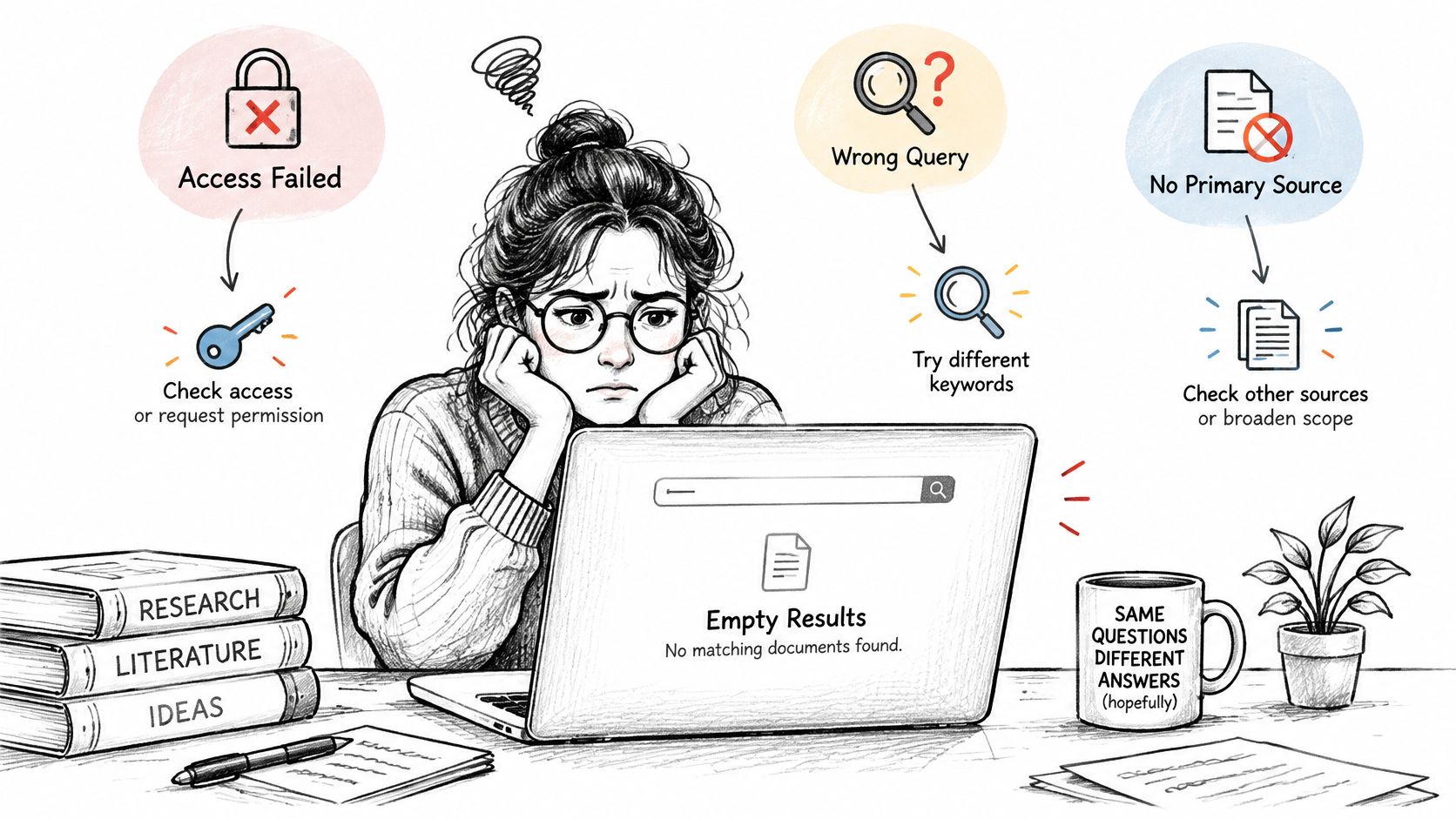
You know a record exists, yet the search returns nothing. Don't immediately add more keywords. First determine whether you couldn't access the record, failed to retrieve it, or retrieved material that doesn't support the answer.
Traditional indexing has long had structural limits. The BBC's reporting on the invisible web explains the distinction between pages exposed to search engines and information retrieved through database searches. The practical lesson is that a missing search result doesn't establish that the underlying information is absent.
Diagnose the failure before changing the query
An access failure means a barrier prevents retrieval, such as authentication, a paywall, or an automated-access restriction. A retrieval failure means the search method didn't reach the relevant record. An evidence-quality failure means you found material but interpreted its figures, scope, or meaning incorrectly.
Use the symptom as a starting diagnosis, not as proof of its cause.
Deep search symptoms, failure categories and remedies
| Symptom | Failure category | Remedy |
|---|---|---|
| No results from a known source | Access failure | Check for login, paywall or robots restrictions, then request access or find an open copy |
| Results change on each rerun | Retrieval failure | Log the parameters, test pagination and sorting, and fix the filter set |
| Relevant pages missing from results | Retrieval failure | Reformulate with synonyms, acronyms and alternative entity names |
| Sources found but figures wrong | Evidence-quality failure | Check scope, denominator and date against the source table |
| Confident summary with no quotable source | Evidence-quality failure | Mark the claim unsupported and record a negative finding |
Choose the remedy that matches the barrier
For a form-driven database, test field combinations deliberately. Search the identifier alone, then the entity name, then the relevant category, preserving each submitted configuration.
Check pagination and sorting too. A portal may display a limited results window or reset a filter when you move between pages. Compare stable record identifiers rather than assuming that a changed display means the underlying records changed.
Some fixes are immediate, such as correcting an acronym or removing an unsuitable filter. Others require the data holder to provide an archive copy, authorized access, or a bulk export.
Don't try to bypass access controls. Record the obstacle and distinguish not found through this method from does not exist. That wording keeps an incomplete search from becoming an unsupported conclusion.
Verifying Claims Before You Trust Them
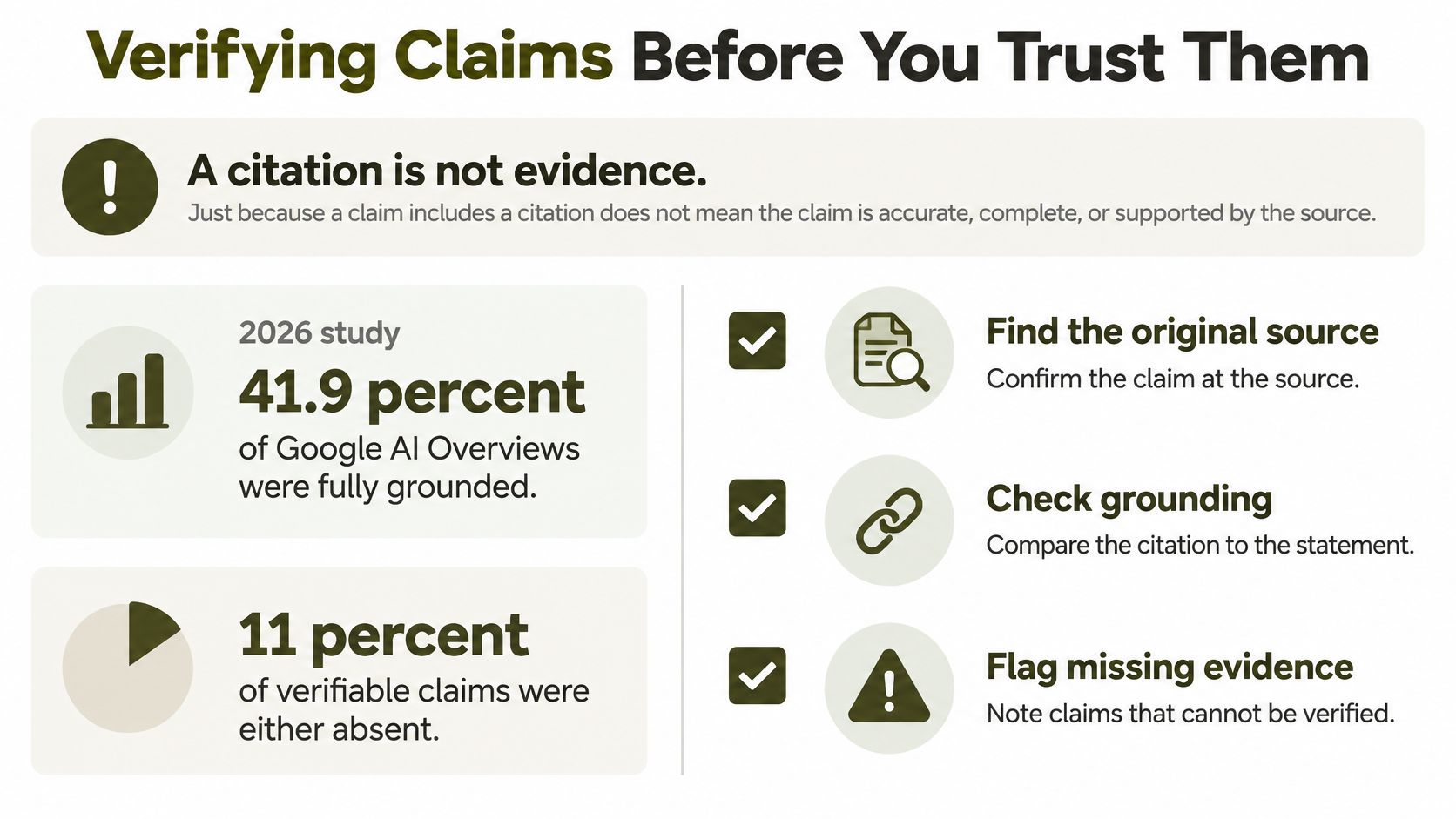
A citation is not evidence by itself. In a 2026 study, only 41.9% of Google AI Overviews were fully grounded, while 11% of verifiable claims were absent from the cited text or contradicted by it, according to Washington University's account of the findings, which also discusses research reporting that 50% to 90% of statements in web-enabled AI answers were not fully supported by their citations.
The relevant test is claim-to-source support. Can a reader open the cited document and find evidence for the statement as written, including its qualifications?
Audit the statement, not the bibliography
Separate credibility from support. Ask whether the author or institution is authoritative, then ask whether the document establishes this particular claim. An official regulator's page can be credible without supporting a statement about a different jurisdiction.
Check scope against the original table. Compare every material number, date, population, unit, and denominator with the source. A figure for surveyed organizations must not become a figure for all businesses, and an association must not become a causal claim.
Flag topic-only citations. A page discussing contract disputes doesn't prove that a particular clause is enforceable. Highlight the exact supporting passage, or mark the connection as unproven.
Find the primary document. Follow a news summary or review to the underlying judgment, filing, dataset, or paper. Check whether the summary omitted exceptions or relied on an earlier version.
Record disagreements. Compare definitions and publication contexts before deciding that sources conflict. If the disagreement remains material, report it rather than selecting whichever source makes the answer cleaner.
Mark unsupported statements as unverified. Remove them from a definitive conclusion, narrow their wording, or explain what evidence is still needed. Plausibility isn't a substitute for documentary support.
Make the evidence chain inspectable
Keep a short claim map with the statement, document link, supporting passage, and verification status. For procedural detail, Model Diplomat's step-by-step AI fact-checking workflow complements this approach, while an AI fact-checking guide can help structure a repeatable review.
A longer citation list can make an answer look authoritative without making it more reliable. Prioritize the claims that could change the reader's decision, and test their wording rather than counting references.
Treat every citation as a claim to test, not as proof already supplied.
Checking Recall Gaps and Stopping Rules
A search can return an impressive collection and still omit the document that changes your conclusion. Recall concerns the relevant material you retrieved, while precision concerns how much of what you retrieved is relevant.
A 2026 analysis published through the ACL Anthology found that full webpages covered about 21% more concepts than generative engines on average, although the additional material was less precise and more loosely related to the query. Concise answers can therefore reduce browsing effort while leaving useful context outside the summary.
Audit what the answer might have omitted
Use a recall audit to challenge the search's framing rather than merely repeating its vocabulary.
- Reformulate the question. Replace the assumed answer with a neutral description of the issue, then search the relevant entity and document type directly.
- Search opposing terminology. Pair a claimed benefit with objections, exclusions, adverse findings, or unsuccessful applications.
- Check primary collections. Inspect the authoritative register or repository even when the AI answer cites plausible secondary material.
- Compare languages and regions. Use local terminology, official agency names, and jurisdiction-specific portals instead of assuming English-language coverage is sufficient.
For example, consider a policy question involving a local regulator. An English query may return international commentary, while a local-language query may reveal the regulator's own guidance or consultation archive.
Don't assume that translated results are equivalent. Confirm whether the documents address the same policy version, territory, and affected group. English-language and highly indexed sources can otherwise crowd out local scholarship or minority perspectives.
Decide when enough is enough
Use an explicit operational stopping rule: stop when two independent reformulations return the same primary records and a further search round adds no new primary source. This is a practical rule for bounded research, not proof that you've searched everything.
Apply another condition before publishing: no unresolved gap should be capable of reversing the decision you intend to make. If an inaccessible appendix could contain the decisive exception, the next action is to obtain it, not to declare the search complete.
Stopping decision: Convergence supports ending a search only within the scope you actually checked.
Record excluded languages, inaccessible collections, missing attachments, and the period covered. A reader should be able to distinguish a well-supported bounded answer from a claim of universal completeness.
Protecting Sensitive Queries and Files
Before searching personal data, contracts, or unpublished findings, map where the query and uploaded files will go. Remove names, account details, signatures, and confidential passages that aren't necessary to answer the question.
Distinguish training use, retention, and deletion. Our stated arrangements exclude conversations and files from model training and provide user-controlled deletion, but anonymized excerpts may be used for analysis and product improvement unless you object in writing. Those purposes shouldn't be treated as interchangeable.
Check the full processing path
A shared AI workspace can involve several processors. Our request routing includes OpenRouter and Google Cloud regions in the United States, and the standard contractual clauses with our web-search supplier, Firecrawl, aren't yet signed. EU hosting alone therefore shouldn't be read as a description of every downstream processing location.
- Minimize inputs. Search a public legal concept before uploading the confidential contract that prompted it.
- Review retention controls. Confirm the applicable retention arrangements and deletion process before submitting sensitive files.
- Sanitize shared records. Keep necessary query text and source links in the ledger, removing personal identifiers before colleagues receive it.
Under Article 17 of the GDPR, individuals can request erasure in specified circumstances, including when personal data are no longer necessary, consent is withdrawn without another legal basis, processing was unlawful, or an objection applies without overriding grounds. Exceptions include legal obligations, public-interest tasks, and protected archiving or research purposes, so confirm the applicable position with the controller or legal team.
The European Commission's general-purpose AI guidance states that relevant obligations began applying on 2 August 2025, including preparing technical documentation and publishing a sufficiently detailed training-content summary. Preparing documentation isn't the same as publishing all of it, so review what information is available and to whom.
Run Your First Audited Deep Search Today
Choose a question from your current work that could change a decision. A useful starting point is whether a regulator's published policy changed in a way that affects a planned contract, purchase, or research project.
Write the decision before opening a search tool. For example, your question might be whether a proposed intellectual property clause needs legal review because the relevant official guidance has changed. That's more actionable than asking for everything about intellectual property contracts.
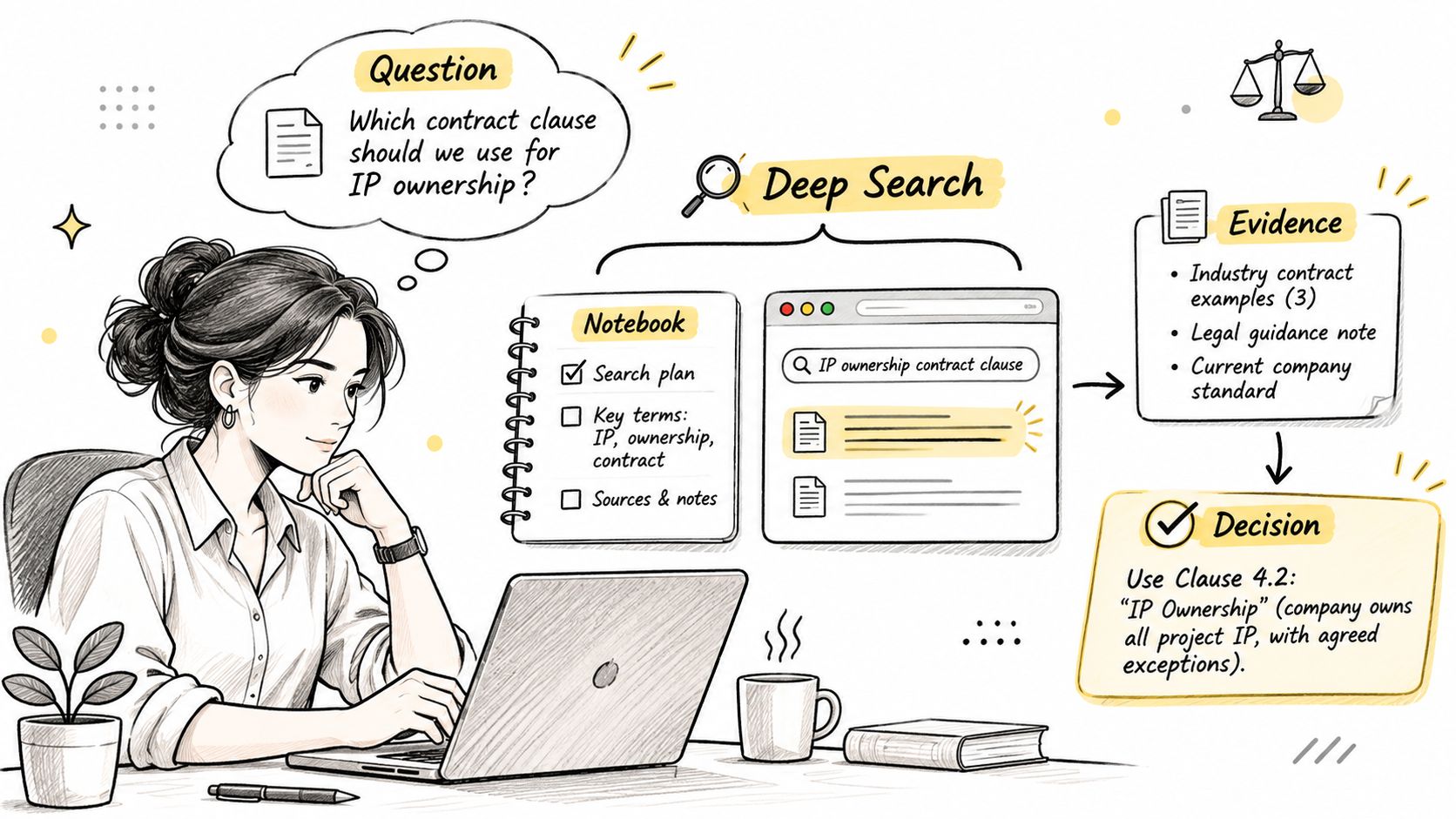
Produce a small, auditable evidence package
Run the procedure with the ledger open beside your browser. Save the primary documents, preserve their titles and version information, and separate the text you found from the interpretation you're considering.
Choose the three claims most likely to affect your decision and verify each against its primary document. For a contract question, those might concern the applicable jurisdiction, the current guidance, and the clause's actual wording, without assuming that any of these alone establishes enforceability.
BromeAI is one option for the search and reading stages. Its agentic AI runs live web searches and attaches sources to the results, with each finding pointing back to its originating document so you can verify it.
- Publish when the material claims are supported and the remaining gaps don't undermine the stated scope.
- Cite when a primary document answers a narrower question than your original draft, and revise the wording accordingly.
- Keep searching when missing records or unresolved contradictions could change the decision.
End with a decision and a reason
Challenge the result through another relevant language or region, then apply the stopping rule. Keep the final evidence package compact enough that a colleague can inspect the decisive documents without repeating all your browsing.
Write a closing decision sentence, such as: The published guidance supports sending this clause for legal review, but it doesn't establish whether the clause is enforceable. That separates a justified next action from a conclusion the documents cannot prove.
The tool can collect and organize evidence. You remain responsible for verification and the decision to stop.
BromeAI offers live web research with attached sources, helping you move from a question to documents you can inspect. Visit BromeAI to try a focused research question, keep an evidence ledger alongside the search, and verify the findings before using them in your work.