How to Use AI Invoice Processing Step by Step
Month end arrives and the accounts payable inbox has 1,600 messages in it. Two hundred are supplier reminders that duplicate an invoice you already have. A dozen are phone photos of delivery notes, and one vendor has sent the same invoice three times under three different dates.
None of that is an extraction failure. It's a routing failure, and routing is the part of AI invoice processing that moves the numbers, long before any model gets a high score on a benchmark.
Table of Contents
- The Invoice Workflow Stages and Where AI Fits
- How to Extract Invoice Fields Reliably
- How to Match Invoices Against Orders and Receipts
- Accuracy Metrics and Confidence Thresholds Worth Tracking
- What Automation Saves and How to Summarize Results
- Privacy and Retention Rules for Invoice Files
- Confirm Your Pilot Before You Upload Invoices
The Invoice Workflow Stages and Where AI Fits
The whole path from mailbox to ledger has five stages. Lay them out before you buy anything, because every vendor demo starts at stage two and stops there.
| Stage | What AI handles | What still needs a rule | Output kept |
|---|---|---|---|
| Capture | Reads PDFs, scans, emailed images and receipts | Keep the original file with an intake timestamp | Source file and intake log |
| Extraction | Pulls vendor, invoice number, dates, currency, tax, totals and line items | Field-level confidence scores | Structured record with bounding boxes |
| Validation | Checks that line items sum to totals and tax matches the rate | Arithmetic and schema rules | Pass or fail flag per record |
| Matching and approval | Compares invoices with purchase orders and goods receipts | Tolerance limits and approver rules | Matched, held or rejected status |
| Posting and reporting | Writes approved records and builds a batch summary | Human sign-off on exceptions | ERP entry and batch report |
Extraction is one stage of five, and it's the one that demos best. A model that reads a messy scan and returns a clean vendor name looks impressive on a screen. It tells you nothing about whether the invoice should be paid, and that judgement lives in stages three, four and five.
The value sits in the controls around extraction. Validation catches the line-item total that doesn't reconcile. Matching catches the invoice with no purchase order behind it. Posting controls catch the record that cleared every gate and still hit the wrong cost centre.
The rule that matters: if you can't name the stage that sends a failed record back, you don't have a workflow. You have a data-entry shortcut with a monthly bill.
Pick your first stage by counting staff hours, not by counting fields. Add up what the team spends each week on capture and on matching, then start where the number is largest. For most mid-sized teams that's capture, because someone is still opening mail and re-keying. For a team already running an OCR tool, it's usually matching, where buyers chase purchase order numbers by email.
Exceptions are where the controls earn their keep. Missing purchase orders, ambiguous tax treatment, duplicate supplier records, quantity mismatches and unusual payment instructions all need a named owner, not a shared queue. Write the owner into the rule so a held invoice lands in a person's list with the reason attached.
Multinational teams have one more constraint before choosing a starting point. E-invoicing mandates aren't uniform, and integration with existing systems was the leading pain point for 55% of businesses in mandated markets and 63% of multi-country sellers, according to Vertex's global e-invoicing research. Confirm which rule set applies in each country before you automate the stage that touches tax fields.
If capture is still manual, the practical first move is to cut manual invoice data entry at the intake boundary, so every downstream control works on one consistent record instead of four different formats.
How to Extract Invoice Fields Reliably
Reliable extraction is a sequence, not a model choice. Run these seven steps in order and most of the accuracy arguments disappear, because the uncertain cases get caught before they reach the ledger.
The sequence looks like this.
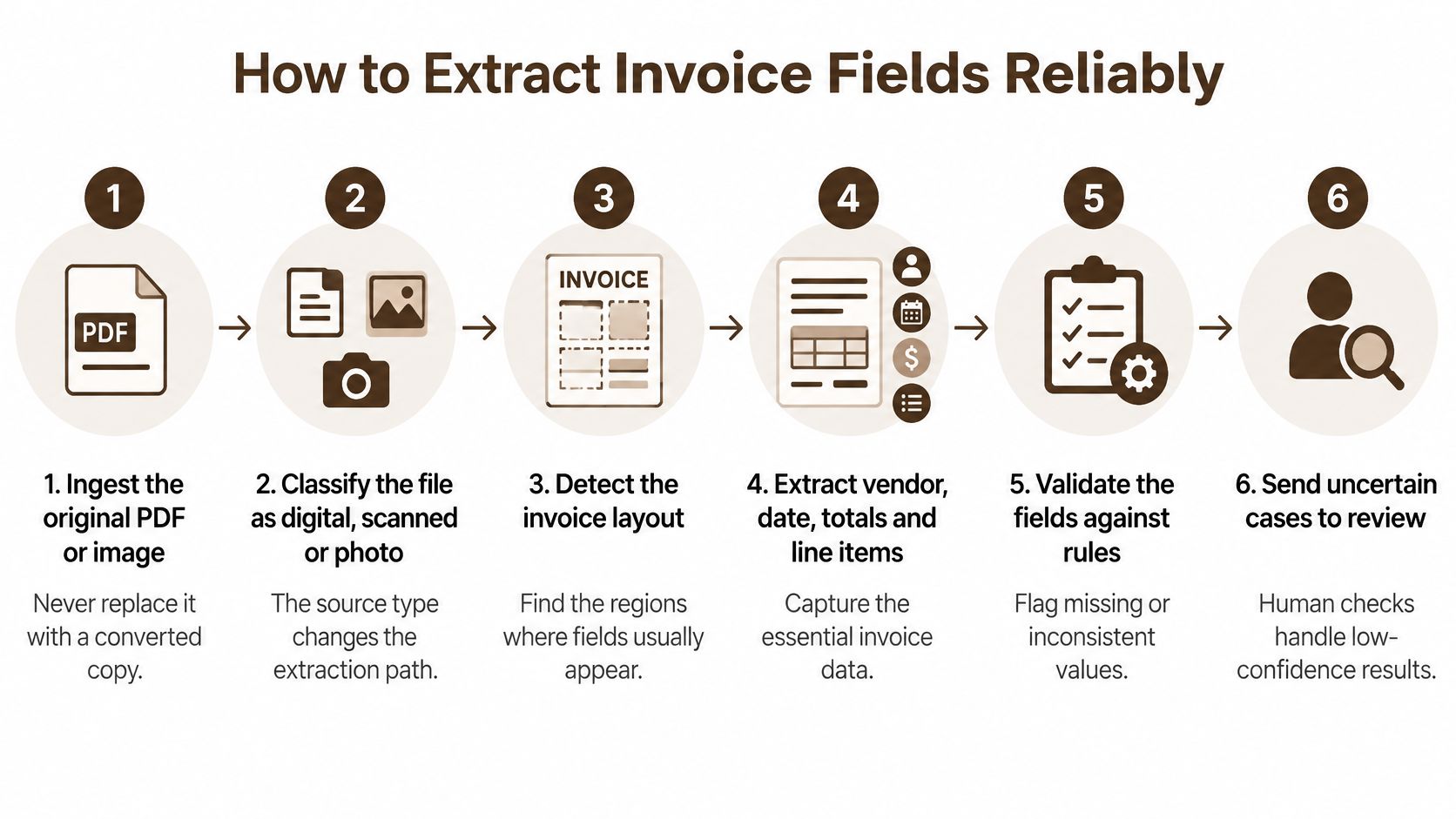
Ingest the original file. Keep the PDF or image exactly as it arrived and never let a converted copy replace it. The original is your evidence when a supplier disputes an amount six months later.
Classify the source type. Mark each file digital, scanned or receipt-like, because each needs its own confidence threshold. A clean structured export and a phone photo of a fuel receipt shouldn't sit behind the same cutoff.
Preserve page geometry. Column alignment and table position carry meaning for line items. Strip them out and a two-column invoice collapses into a paragraph of numbers with no relationship to each other.
Extract from the native image. Pull header fields, vendor identity, tax, currency, totals and line items without converting to plain text first. A benchmark of eight multimodal models across three public invoice datasets found native image processing reached 92.71% accuracy on scanned invoices versus 64.03% for the parsed-text route, and 87.46% versus 47.00% on scanned receipts, as the extraction benchmark reports.
Normalize dates and money. One date format, one currency code, one decimal convention before anything else touches the record. Mixed formats are the most common cause of a correct extraction that fails validation two stages later.
Validate arithmetic and tax. Line items must sum to the subtotal, subtotal plus tax must equal the total, and the tax amount must match the rate for that regime. Run the check on every record, including the ones carrying a high confidence score.
Route by field, not by document. Send low-confidence fields to a reviewer who corrects that single field. Reprocessing the whole document throws away the good work and slows the queue for everyone.
The clean-run test: open any posted record and you should see the source file, every field value, its confidence score, the bounding box it came from, and the model version that read it.
A common slip is converting every invoice to text to save compute, then wondering why multi-column tables break. Text-only preprocessing discards layout, table alignment, font and spacing cues, which is exactly the information a line-item table depends on.
A high document-level score is not proof that the totals are right. Treat it as a signal about the page, then run arithmetic and schema validation on the numbers regardless, because totals, tax amounts, currencies and multiline tables are where quiet errors concentrate.
If you're comparing engines, this roundup of top IDP software for small businesses is a reasonable shortlist to test against your own sample files rather than a vendor's demo set. Once the fields are structured, document analysis lets you review the invoice next to the purchase order and the contract in one pass instead of toggling between three windows.
How to Match Invoices Against Orders and Receipts
The duplicate that gets through is rarely an exact copy. It's INV-10482 and INV-10482-A, eight days apart, same amount, same vendor, and the suffix is enough to defeat a naive exact-match rule on the invoice number.
That's the one to design against first, because duplicates are the cheapest error to prevent and the most expensive to unwind. Start with the record set, not the document.
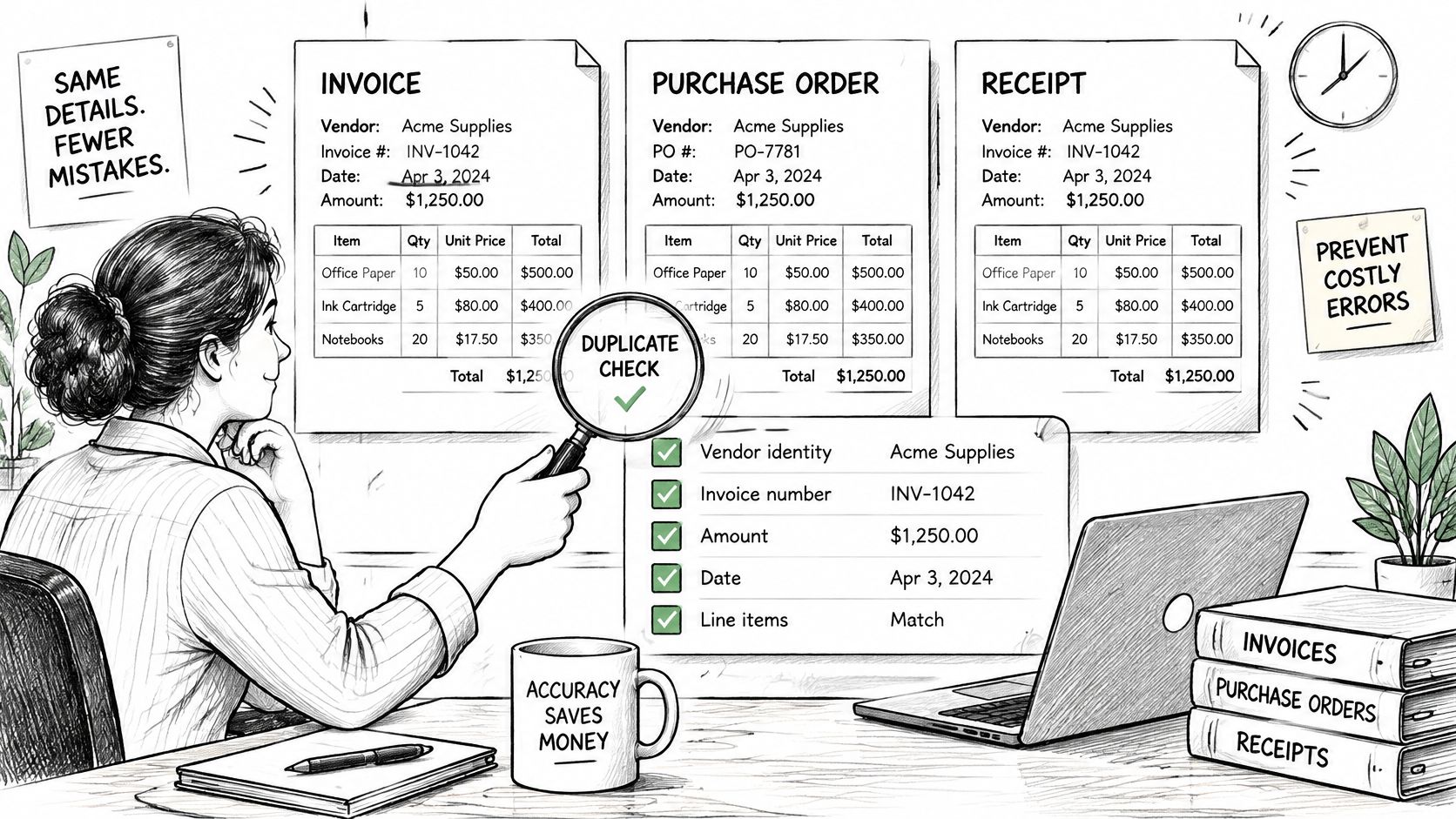
Compare vendor identity, invoice number, amount, date and purchase order reference against recent records, then handle the three cases that beat simple matching. A near-identical invoice number with a suffix. The same amount billed again under a new date. One supplier registered twice under two vendor IDs, which you fix in the master data rather than in the matching rule.
Duplicate detection alone doesn't prove the goods or services were ordered and received. That's what three-way matching adds:
- Match the invoice to its purchase order. No PO reference means it goes to review, not to payment.
- Match the quantities to the goods receipt. A receipt for 40 units against an invoice for 60 is a mismatch, not a rounding issue.
- Match the price and total to the agreed rate within a tolerance you've written down, per category and per supplier.
- Hold any mismatch with the specific reason attached, so the reviewer never has to reconstruct why the invoice stopped.
An independent 2025 accounts-payable benchmarking summary found that AI-assisted duplicate detection identified 98% of duplicate invoices before payment, compared with 63% for manual review, and that 54% of surveyed organizations had automated three-way matching between purchase orders, receipts and invoices, per the AP automation benchmark summary.
A held invoice needs a destination. Send it to the named budget owner with the mismatch written out in one line, and set a clock on it. An invoice that sits in a queue for three weeks costs you the early-payment discount and a phone call from a supplier who assumes you're not paying.
Accuracy Metrics and Confidence Thresholds Worth Tracking
A single accuracy number is the least useful metric in invoice automation. It hides which fields fail, and it hides them in the places that cost money. A composite score of 90% can mean perfect vendor names and a tax total that is wrong on every fourth invoice.
A comparative study reported 63% overall accuracy for a layout and OCR-oriented method versus 94% for an LLM-based extractor, and the gap wasn't spread evenly: invoice names and numbers reached about 90% in the weaker method while tax amount, net amount and currency-format fields sat near 60% because of complex tables and unstructured text, per the invoice understanding study. Results that diverge this far between methods on the same documents tell you model choice matters as much as any headline score, so test engines on your own invoices before trusting a vendor's marketing number.
Track the control metrics instead. These measure whether invoices post correctly, not whether a demo looked impressive.
| Metric | What it measures | Why it matters |
|---|---|---|
| Field-level exact match | Share of extracted fields identical to a labeled value | Shows which fields need work, not just the overall score |
| Precision and recall or F1 | Balance between wrong extractions and missed fields | Catches fields that are often missing or invented |
| Validation-pass rate | Share of records passing arithmetic, schema and duplicate checks | Measures whether extraction output is safe to post |
| Exception rate | Share of invoices routed to a human reviewer | Shows reviewer workload and where rules are too strict |
| Straight-through-processing rate | Share of invoices posted with no human touch | Shows real automation, not only extraction |
| False approval rate | Share of bad invoices that passed every check | Measures financial risk from permissive tolerances |
Build the labeled sample from your own traffic. Cover every vendor group, country, language and tax regime you receive, plus scanned and handwritten pages, credit notes and line-item variants. A sample of clean digital PDFs will flatter any engine and teach you nothing. A few hundred invoices drawn proportionally from real volume beats a thousand hand-picked easy ones.
Where I'd set the first threshold: any total or tax amount below the confidence floor goes to review, no exceptions, even if the vendor is one you've paid for a decade.
Set thresholds per field, not per document, and keep the strictest limits on totals, tax amounts and currency. A wrong currency code is cheap to catch at extraction and expensive to unwind after payment. Post a record automatically only when it clears schema, duplicate, purchase order and three-way matching checks, and send everything else to a person. Then calibrate against the two failure directions: if the exception rate climbs, reviewers rubber-stamp and false approvals follow; if the floor is too loose, bad invoices go straight through and you find out at audit.
Watch drift by vendor and by document type each month. One aggregate number can sit flat while a single supplier's tax layout starts failing every time they change their template. No extractor is guaranteed error-free either. Our own terms state this plainly: the service is provided as available and Polyware does not guarantee the accuracy, reliability or error-free nature of AI-generated responses. Design the review step on the assumption that the model will sometimes be wrong, and the metrics above tell you when it is.
What Automation Saves and How to Summarize Results
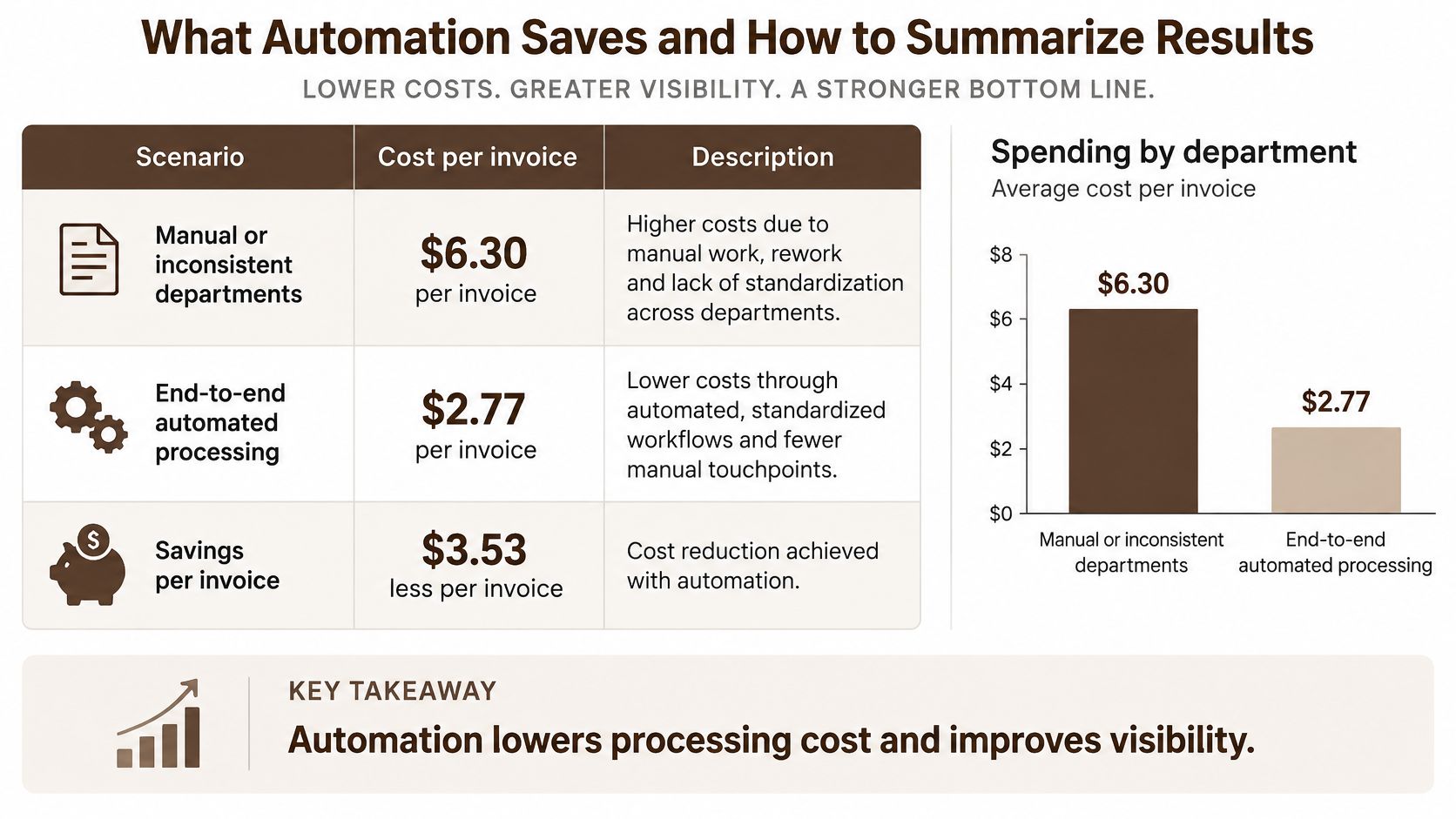
The cost case is settled enough to open the business case, but the saving only counts if exceptions stay controlled. A benchmark cited by SAP Concur compared departments with no automation and inconsistent processes against departments running end-to-end automation and consistent workflows.
| Process type | Cost per invoice | Invoices per FTE |
|---|---|---|
| Manual or inconsistent process | $6.30 | 8,689 |
| End-to-end automation with consistent workflow | $1.45 | 18,649 |
| Difference | $4.85 (about 77% lower) | Roughly double |
Manual or poorly standardized departments spent $6.30 per invoice, while automated departments spent $1.45, a reduction of about 77%, and each full-time equivalent handled more than twice the volume, according to the SAP Concur invoice automation benchmark.
At scale the gap is hard to argue with. A $4.85 difference per invoice becomes $48,500 for every 10,000 invoices, before you count faster approvals, fewer keying mistakes or fewer supplier calls chasing payment status.
Those figures are not a universal price. Invoice complexity, labour cost, geography, ERP integration and exception rates all move the result, so rerun the arithmetic on your own volumes and your own burdened hourly rate before you quote a saving to anyone.
The summary a finance lead should get every week is short. Invoices received, share posted without a touch, exceptions grouped by reason, average time to resolve one, duplicates caught before payment, and total value still on hold. Anyone can pull those numbers from a filtered export.
Worked example: a team receiving 2,000 invoices a month at a 40% exception rate has 800 items to review. If the exceptions cluster under "no purchase order", the problem is procurement discipline. If they cluster under tax mismatch, adjust the field threshold. If they cluster under awaiting approval, the approver routing is broken.
You can build that view with a scheduled weekly exception and posting report step rather than assembling it by hand each Friday. Judge the result by false approvals and straight-through rate, not extraction accuracy alone: a cheaper invoice that still lets a bad payment through is faster risk, not automation.
Privacy and Retention Rules for Invoice Files
Invoices carry more personal data than many people realise. Names, addresses, bank details, tax identifiers, employee expense information, and purchasing records all sit inside a PDF that gets emailed around a finance department.
The European Data Protection Board is direct about the constraint: personal data storage must be limited in time according to the purpose for which the data was collected and processed, and data should be deleted or anonymized once it's no longer necessary, as set out in the EDPB guidance for small organisations.
Build the policy in this order.
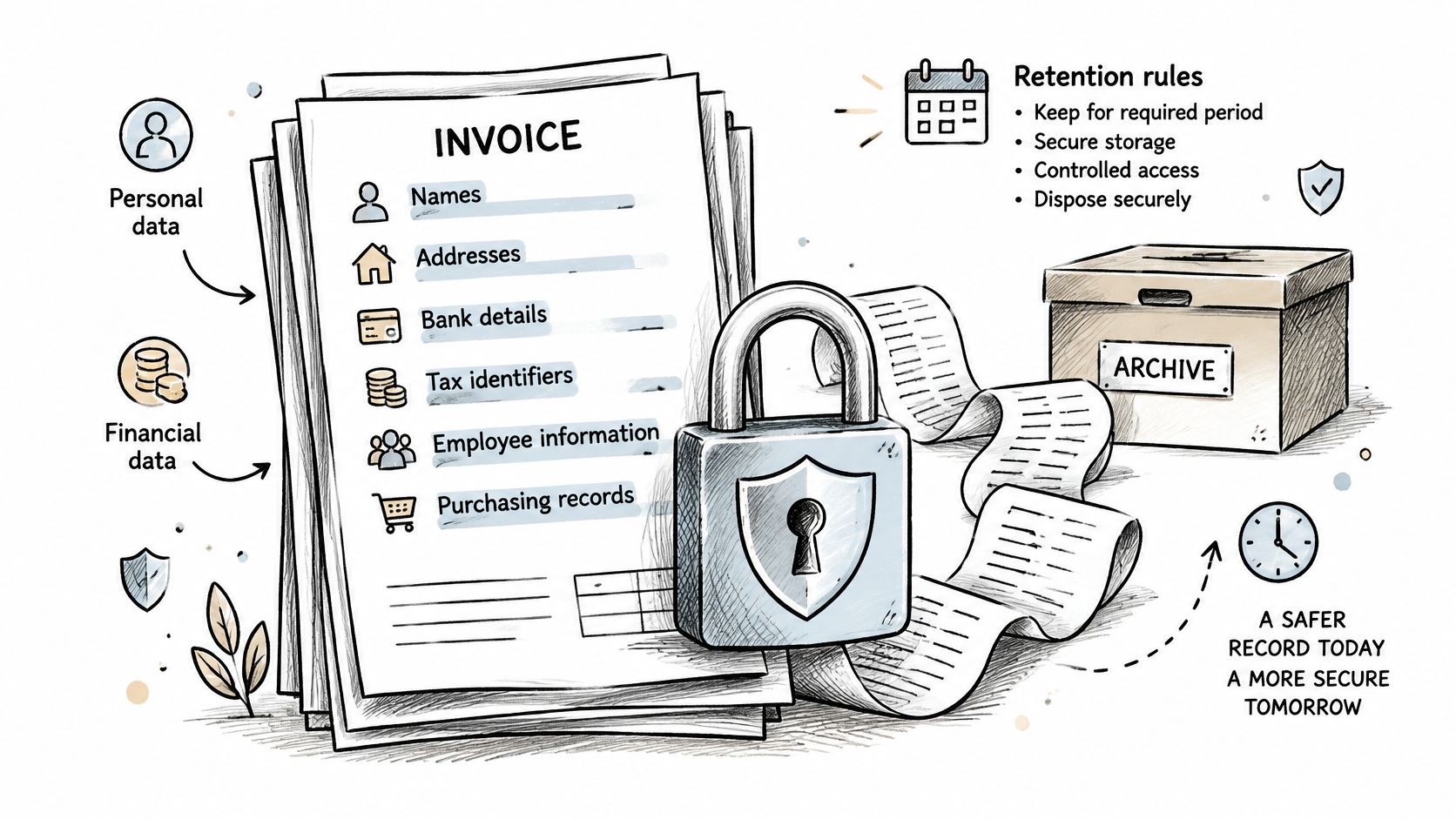
- List the fields that carry personal data and mark the ones the workflow needs. A reviewer correcting a line-item quantity doesn't need the full bank record on screen.
- Set a retention period per document type. Audit-relevant posted invoices run longer than rejected uploads or duplicate copies, and the schedule should say which is which.
- Restrict access by role, so reviewer, approver and controller each see a different slice of the same document.
- Get the vendor's terms in writing on storage location, processing, deletion and who else may handle the files, before any live upload happens.
- Test deletion on a sample file and record the result. A policy you've never executed is a paragraph, not a control.
Retention rules and access control have to hold in your own systems regardless of what a vendor claims about security. Provider promises about training exclusions narrow secondary use, but they don't replace retention schedules, role-based access or user-directed deletion.
Policy line to paste into your procedures: Invoice files are kept for the period stated in the retention schedule because [purpose], accessible only to the AP reviewer, approver and controller roles, and deleted or anonymized when [condition]. Deletion requests are logged with a date and the name of the person who actioned them.
For business clients acting as controllers, we act as processor under a data processing agreement accepted at subscription, and we give at least thirty days' notice before adding or replacing a sub-processor. Delivery details are on our privacy page.
Confirm Your Pilot Before You Upload Invoices
Don't run a pilot on whatever the vendor sends you. Run it on your own worst documents, because the demo set is always clean.
- Pick one vendor group with steady volume and pull 200 to 300 invoices from the last quarter.
- Label about 50 of them by hand, covering scans, credit notes, multi-page invoices and any cross-border invoices under a different e-invoicing mandate.
- Run the workflow and record field accuracy, validation-pass rate, exception rate and false approvals.
- Set per-field thresholds from the results and keep anything under them in review during the pilot.
- Decide to go, adjust or stop based on whether exceptions fall to a volume the team can clear in a normal week.
If the pilot reads well on clean PDFs and falls apart on scans, adjust the thresholds and rerun before going live. That pattern is common and it's not a reason to abandon the project. It's a reason to classify source types properly at stage one.
Test any tool that claims to handle PDF, DOCX or spreadsheet files on your own labeled sample before it touches live payments. A vendor's format support list describes what the parser opens, not how accurately it reads your supplier's three-column table with a handwritten tax amount.
If you're weighing whether to build the routing layer in-house or buy it, Internal Systems on AI tooling decisions sets out the trade-offs in a way a finance team can use.
The stop rule: approve the pilot only if validation-pass and false-approval numbers meet the targets the team wrote down before the test started. Moving the targets afterwards is how a failed pilot becomes a live payment risk.
BromeAI handles the document side of this work in one place. You can drop invoice PDFs, purchase orders and an XLSX payment log into a single case, compare invoice numbers and amounts across them, and get repeated entries listed for review, which shortens the duplicate check that manual review catches only part of the time. Visit BromeAI to try a document comparison on your own sample invoices before you commit to a full workflow change.