AI Aggregator Platform Explained: Models in One Workspace
You've got a draft open, an invoice to check and a research question that needs sources. In a typical afternoon, you might juggle three AI subscriptions and five browser tabs, copying background from one assistant into another. The annoying part isn't writing the prompts. It's deciding where to send them and keeping the work together.
An AI aggregator platform offers a shared workspace for that situation. Whether it helps depends on more than the models listed on its homepage. You need to understand how it chooses models, what completed work costs, whether its citations hold up and what happens to your files afterward.
Table of Contents
- What an AI Aggregator Platform Does
- How One Workspace Routes Each Request
- Judging Whether Routing Saves Money and Time
- Single Subscriptions, Separate Tools or an Aggregator Compared
- Where Document Analysis Saves Time and Where It Needs Review
- Checking Sources in Agentic Research Results
- Privacy, Training and Deletion Terms to Check
- Confirm Your Workflow Before You Subscribe
What an AI Aggregator Platform Does
An AI aggregator platform is one workspace that gives access to several AI model providers through a single interface and a consolidated bill. Depending on the service, its picker might include models or services associated with ChatGPT, Claude, Gemini, Mistral, DeepSeek, Perplexity and Qwen. You submit work in the shared workspace instead of maintaining a separate conversation with each service.
Think of a travel search site. It puts fares from different airlines on one screen, so you can compare options without opening every airline's website. The airline still operates the flight. In the same way, an aggregator organizes access, but the selected provider's model still generates the answer.
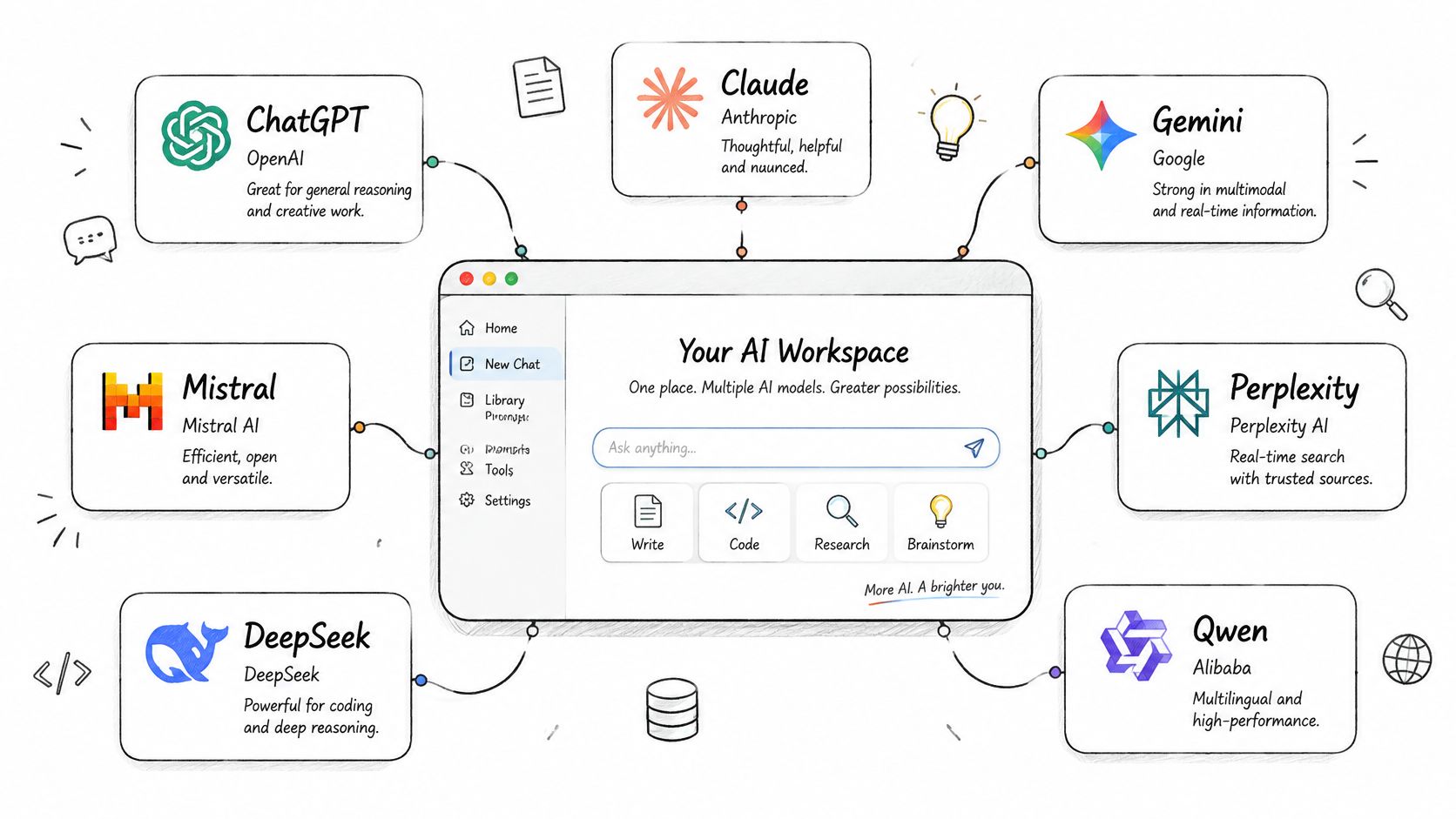
A shared workspace, not a new model
The distinction matters because aggregation doesn't create a universally better model. A platform can make it easier to move between coding, document analysis and research, but the underlying models still have different capabilities and limitations. Access through an aggregator also doesn't necessarily include every feature available in a provider's own application.
The demand for this kind of coordination has grown alongside organizational adoption. Stanford's 2025 AI Index reports that 78% of surveyed organizations used AI in at least one business function in 2024, up from 55% in 2023, while generative AI use increased from 33% to 71% over the same period.
That adoption doesn't mean everyone needs multiple models. A student revising an essay may be comfortable with one assistant. An engineer who alternates between debugging, reading technical documents and researching unfamiliar libraries has a different task mix.
Quick self-test: Count your AI subscriptions, the tabs you switch between during normal work and the occasions when you need a different model.
If you rarely change tools, consolidation may offer little benefit. If you repeatedly reconstruct the same background in different conversations, a shared workspace is worth investigating. The useful question isn't how many models it advertises, but how much duplicated work it removes.
How One Workspace Routes Each Request
Suppose you ask an AI workspace to extract fields from an invoice. A routing system sits between your message and the model that responds, classifying the task and selecting a model according to the platform's policies.
- You send a request in a conversation, with any relevant files and background.
- A classifier identifies the task, such as document extraction, coding, research or creative generation.
- The router selects a candidate model, weighing expected answer quality, cost and speed.
- The answer returns in the same workspace, with the responding model identified.
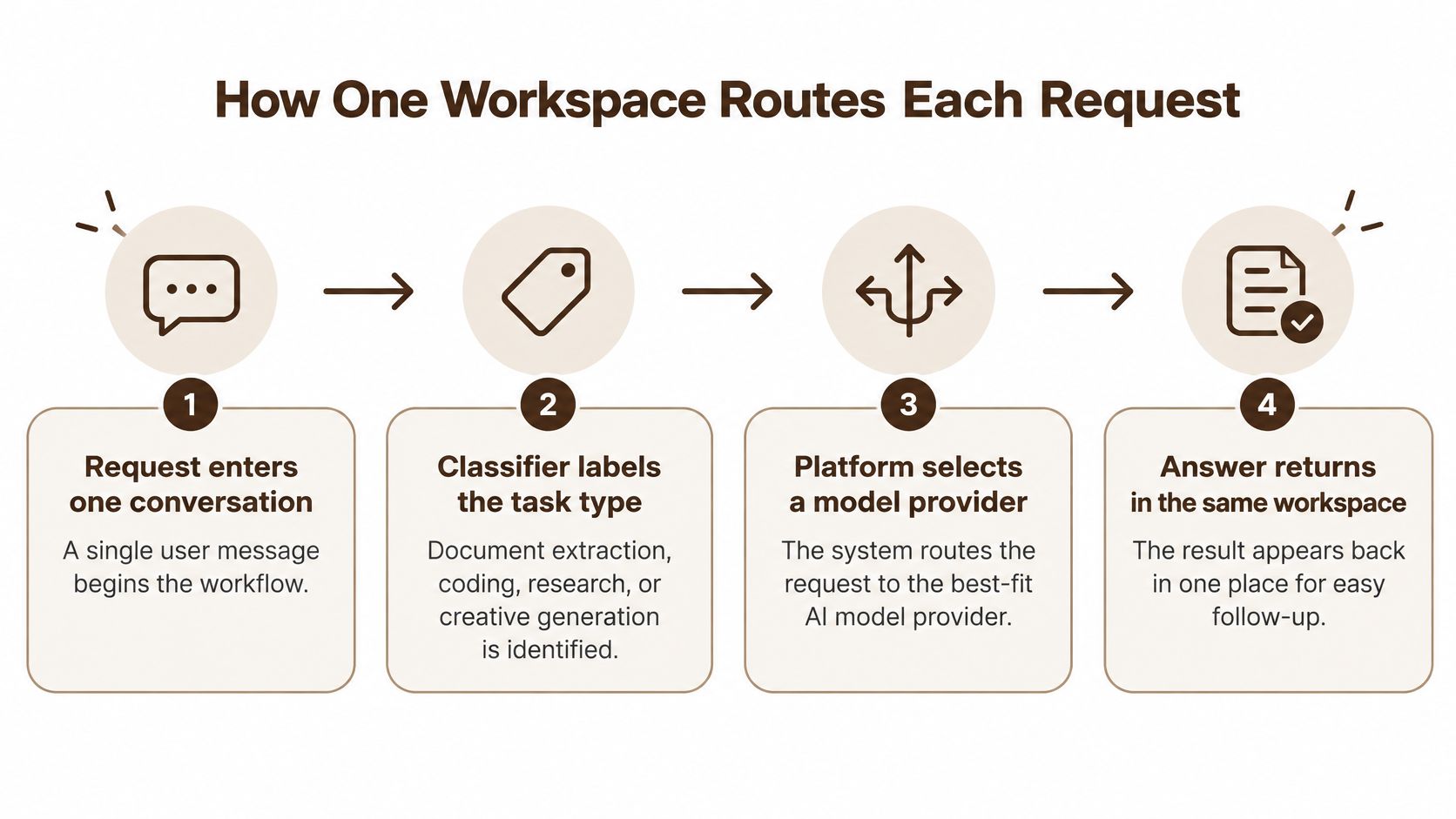
Why automatic and manual selection coexist
A hospital triage desk directs patients to a suitable specialist. An AI router makes a narrower computational choice, but the organizing idea is similar: classify the work before deciding who handles it.
A request to extract invoice fields, for example, is structured document work. Explaining a failing test is a different task. The router applies a policy to select a model suited to the request and the platform's operating constraints.
Automatic routing delegates the model choice. A manual picker lets you choose a specific model when you want predictable behavior, a direct comparison or control over which provider receives a request. BromeAI's automatic routing feature describes this approach.
Neither mode replaces the other. LLMRouterBench found that model complementarity could produce up to a 4% average accuracy improvement over the best single model, or reduce cost by as much as 31.7% while maintaining best-single-model performance. No routing policy dominated across all datasets and objectives.
Those are benchmark results, not a promise about your own tasks. Evaluate routing against the work you do, and keep a way to override a poor model choice.
Multi-step work needs step-level routing
An agentic job involves more than sending a prompt and receiving text. A request for a supplier briefing supported by public sources and accompanied by a presentation image may require several steps: forming search questions, finding and reading pages, comparing evidence, writing the briefing and generating the visual.
Different steps may suit different models. One could organize search questions, while another handles evidence synthesis or a final check. The routing decision can therefore change as the job progresses, rather than committing every step to the model that received the first message.
With BromeAI's Agentic AI, you describe the outcome, Brome breaks it into tasks visible before anything runs, and it reports back with sources once every task is done. The visible plan lets you catch a misunderstanding before it affects the rest of the work.
A completed task list does not prove the answer is complete. If a required source could not be accessed, the report should make that gap clear.
For ordinary conversation, context matters too. BromeAI's workspace lets you continue a conversation when switching models mid-thread, without pasting the background again. State the goal clearly when you switch: shared context helps the next model follow the discussion, but it does not guarantee that every earlier message will be interpreted correctly.
Judging Whether Routing Saves Money and Time
Judge routing by completed work, not the price of an isolated reply. The SwitchCraft model-routing project reports a 2026 evaluation with 82.9% accuracy and an 84% reduction in inference cost, while also explaining why cheaper models can cost more per completed request through longer outputs and unsuitable tool choices.
Speed needs similar scrutiny. Research on routing and inference explains how overloaded routed paths increase latency. External-provider workflows differ from local expert routing, but a job still can't finish before its slowest required stage.
Routing metrics to log
| Metric | What it reveals |
|---|---|
| Selected model | Where each task was sent |
| Token count | Output length behind the price |
| Time to first token and total latency | Waits created by multi-provider dispatch |
| User corrections | Errors that cheaper models pass downstream |
| Retry calls | Hidden cost that can erase apparent savings |
| Cost per accepted result | The real comparison across models |
Record the task category and final quality outcome alongside these metrics. Compare cost per accepted result with time from request to usable answer, including your correction time.
For metered creative work, Veo3 AI's explanation of credits versus subscription pricing offers useful context for examining billing units.
A cheaper answer isn't a saving if you spend longer repairing it.
Single Subscriptions, Separate Tools or an Aggregator Compared
Read across this comparison to see who controls model choice, how you pay and what effort each setup requires.
Setup options compared
| Setup | Models reachable | Billing | Who picks the model | Best fit |
|---|---|---|---|---|
| Single provider subscription | One provider's model family | One plan | You, within that provider | One model covers most of the work |
| Separate subscriptions per provider | Several providers, one tab each | Several bills | You, by switching tabs | Users with strong preferences for one tool per task |
| AI aggregator platform | Several providers in one workspace | Consolidated subscription | Automatic routing or manual picker | Mixed tasks across writing, research, documents and images |
| Self-built API router | Any provider you connect | Pay per provider usage | Your own routing code | Engineering teams that need custom routing and logging |
Start with task mix, not model count
Someone who mainly drafts emails may have little reason to add routing. Someone who moves between source analysis, spreadsheets, code and images has more opportunities to benefit from model choice. The difference is the work, not enthusiasm for trying new models.
Separate provider subscriptions can still be sensible. You may rely on an application-specific editor, collaboration feature or workflow that an aggregator doesn't reproduce. Check those dependencies before cancelling a direct subscription.
Then examine your bills and switching habits. Total your current subscription spending and note when moving between tools interrupts a task. Include the effort of finding an old conversation, reattaching a file and explaining a decision you already made elsewhere.
Decide how much control you need
A self-built API router gives an engineering team control over selection rules, evaluation and logging. It also makes the team responsible for credentials, provider changes, failures and ongoing maintenance. Building a connection is only the beginning.
For developers considering that route, BeatAPI's guide to alternatives to OpenRouter for developers is a useful starting point for identifying gateway options to evaluate. Compare the capabilities you need, including observability and failure handling, rather than choosing solely by the size of a model catalogue.
Data terms deserve a separate decision. An aggregator adds an organization and a contract to the processing chain. It doesn't remove your obligation to understand provider rules or your own responsibilities when handling client information.
Decision rule: If you use three or more AI tools across mixed tasks, test an aggregator. If one model covers almost everything, a single subscription is usually enough.
Treat that as a practical screening rule, not a promise of savings. Keep the setup that fits your daily work with the least unnecessary administration.
Where Document Analysis Saves Time and Where It Needs Review
A 2025 comparative study of six widely used language models found that the strongest systems achieved a 92% F-score on invoice-level approval decisions, against 72% for the best human reviewers, and up to 81% on line-item classification, against 43% for human reviewers.
F-score balances catching the right items with avoiding false alarms. The study used expert-reviewer consensus as its ground truth, so these are results for a defined evaluation, not a promise that an AI will approve your invoices correctly.
Invoice review accuracy by task
| Task | Best AI model | Best human reviewer |
|---|---|---|
| Invoice-level approval decisions | 92% F-score | 72% F-score |
| Line-item classification | 81% F-score | 43% F-score |
The useful workload is often a case rather than an isolated file. You might need to read a contract, compare its billing rules with invoices and reconcile the result against an XLSX spreadsheet. Shared document analysis can help organize contract risks, possible duplicates and unexplained figures for review.
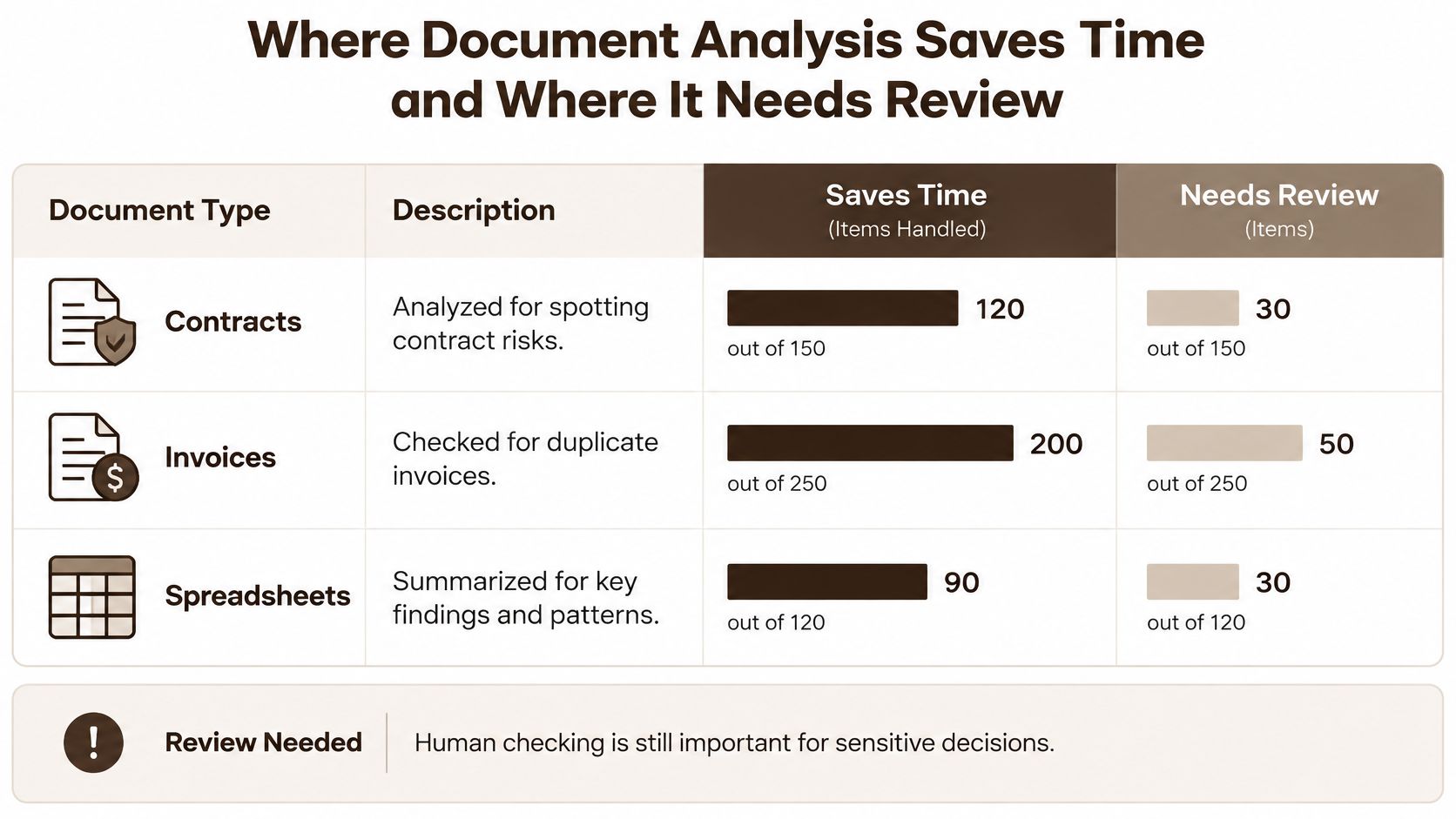
Keep the original files within reach
Extraction is a different task from judging whether a charge is allowed. An invoice-extraction study identifies complex tables, unstructured text and multi-line descriptions as sources of weaker results, with performance differing across field types.
That distinction matters when the answer looks plausible. A mistaken currency, missed credit note or merged table row can affect the entire comparison. An apparent duplicate may instead be a revised invoice or a legitimate recurring charge.
Use a review sequence that makes the answer traceable:
- Upload the contract and invoices together, with filenames that distinguish versions and billing periods.
- Ask for each invoice line to be checked against a named contract clause, with unmatched items listed separately.
- Request the page, table or spreadsheet cell behind every extracted figure.
- Recalculate totals yourself using the original values and spreadsheet formulas.
- Send disputed charges and high-value items to a human reviewer for professional sign-off.
For long documents, the AI PDF summarizer guide is relevant to the initial reading stage. Keep summarization separate from verification: a concise overview doesn't establish that every amount was extracted correctly.
If access costs also influence your document workflow, AccountShare's guide on how to cut AI costs with shared access offers a billing perspective. Don't let an access arrangement substitute for checking who can view confidential files.
The appropriate output is decision support: a prioritized list of questions, discrepancies and supporting passages. A reviewer should be able to move from each finding back to the original document without reconstructing the model's reasoning.
Checking Sources in Agentic Research Results
A polished answer with neat citations can look checked even when it isn't. The true test is whether the cited passage supports the claim beside it, not whether the answer contains clickable links.
An independent evaluation of deep-research systems reported citation accuracy ranging from 40% to 68%, with frequent misattribution. That makes source verification part of the work, not an optional finishing touch.
Think of a footnote as a receipt. A receipt only helps if its details match the purchase. Likewise, a relevant-looking page doesn't support a sentence that changes the population, measure or conclusion.
Check the claim, not just the link
- Open every cited link. Confirm that the page loads and contains the material the answer claims to have used. A title or search snippet isn't a substitute for reading it.
- Find the supporting passage for each key claim. Compare the subject, scope and qualifications with the generated wording, especially when the answer presents a broad conclusion.
- Identify primary and secondary evidence. A study, official filing or original policy can answer a different question from a commentary article describing it.
- Check the publication date and any update notice. A page can be accurate about an earlier policy while being unsuitable for a current decision.
- Look for disclosure of inaccessible sources. An agent should distinguish material it read from material it only discovered.
- Request a research trail connecting claims to workflow steps. This helps you locate whether an error entered during retrieval, extraction or synthesis.
Watch the synthesis step
A system can retrieve the correct source and still overstate it. For example, a study about a defined invoice-review task doesn't establish that automated accounting is dependable across every business. The unsupported leap happens when the system turns a narrow finding into a general recommendation.
Ask for short supporting excerpts alongside important conclusions. If the evidence is ambiguous, the answer should preserve that ambiguity rather than fill the gap with confident prose. Separating verified, inferred and unresolved claims makes review more manageable.
The deep web search guide provides context for source-gathering workflows. Treat a completed search as material to inspect, not as certification that its conclusions are sound.
Legal, medical, financial and academic claims need human review before you repeat or act on them. Protecting a conversation from model training and accurately interpreting a source are separate responsibilities. Neither guarantee proves the other.
Privacy, Training and Deletion Terms to Check
A training exclusion isn't a deletion guarantee. It describes whether submitted material may be used to train models. Retention describes what remains stored, while deletion describes how stored material is removed.
Our stated arrangements include zero data retention agreements with every AI model provider we work with, exclusion of conversations and files from training, user-controlled deletion through the profile and EU hosting. These address different parts of data handling, so they should be understood separately rather than compressed into a general assurance of privacy.
The European Data Protection Board's report on its 2025 right-to-erasure enforcement work recommends documented procedures, assigned responsibilities, clear deadlines, staff training and verification that erasure has occurred. It also addresses locating personal data across systems and backups.
Follow the full processing chain
EU hosting tells you something about the workspace's hosting arrangement. It doesn't establish that every service involved processes information only inside the EU. Model routing, search, analytics and billing can involve different processors.
For example, our request-routing chain includes OpenRouter, with Google Cloud regions in the United States. Our web-search provider is Firecrawl, whose standard contractual clauses are not yet signed. These details matter when you assess whether a workflow is suitable for regulated or confidential material.
Ask which recipients receive message content, uploaded files or account information, and distinguish their roles. Provider-level retention agreements shouldn't be assumed to describe every operational record held throughout the service.
Test deletion without exposing real information
Use a harmless dummy document before introducing sensitive client files:
- Confirm the training exclusion in writing, including its application to conversations and uploads.
- Review retention terms for each model provider and the relevant supporting processors.
- Upload a clearly named dummy file, delete it through the profile and confirm it no longer appears in the interface.
- Check how backups and inaccessible copies are handled, including the schedule and evidence available for completed erasure.
- Keep sensitive client contracts out of general chats until the processing arrangements meet your requirements.
Disappearance from the interface is a useful test of user controls, but it isn't proof of backend erasure. For that, you need a documented explanation of how the service locates copies and confirms completion. Keep the applicable terms and any written clarification with your organization's approval record.
Confirm Your Workflow Before You Subscribe
Choose among a single provider, separate subscriptions, an aggregator and a self-built router by testing the work you do. A long model list is less useful than a reliable result on your own files and questions.
Run a practical trial
- List last week's tasks, including abandoned attempts and work you finished manually.
- Group them into writing, coding, research, document analysis and creative production.
- Record the tools and monthly spending attached to those tasks.
- Run the same pair of representative tasks through the aggregator and your current tool, using equivalent inputs.
- Compare time, errors and source quality, including corrections and retries.
- Review privacy terms before uploading client files.
Use the routing metrics to judge the trial. Record what you accepted and why, rather than marking every generated answer as a success.
BromeAI is one option to trial. We bring ChatGPT, Claude, Gemini, Mistral and other AI models together in one European platform, available on web, iOS and Android with synced conversations. You can start a test on a laptop and continue it on a phone.
Keep the setup that produces usable work with acceptable effort and data handling. Your completed tasks provide better evidence than a headline about automatic selection.
BromeAI offers a shared workspace for multiple models, automatic routing and manual selection, so you can test whether consolidation fits your work. Visit BromeAI and compare a real task with your current setup, checking the result, its sources and the time you spend reviewing it.