What Is an AI Chatbot Aggregator and How Does It Work
Your browser already tells the story. Three AI tabs sit pinned at the top of your window, each tied to a separate monthly invoice, and your clipboard is doing the heavy lifting between them. You paste a messy draft into one chatbot, dislike the tone, copy the same background notes into a second tab, and then struggle to remember which window holds the spreadsheet you uploaded yesterday.
That daily friction is why the AI chatbot aggregator category exists. Most roundups treat these platforms like model leaderboards, arguing over which chatbot writes better poetry or clears a coding test this month. Model quality matters, of course, yet it's rarely where multi-model tools break down in real work.
The two real risks sit under the surface. The first is the routing decision, meaning how a platform chooses which model handles your prompt and recovers when that choice misses the mark. The second is the data path, meaning exactly where your prompts, contracts, and spreadsheets travel once they leave your screen.
Table of Contents
- What an AI Chatbot Aggregator Is in Plain Terms
- Separate Subscriptions Versus One Shared Workspace
- How Automatic Routing and Model Switching Work
- When Routing Helps and When It Goes Wrong
- Who Uses an Aggregator and for What Work
- Privacy and Data Handling Across Model Providers
- Test an Aggregator on Your Own Work This Week
What an AI Chatbot Aggregator Is in Plain Terms
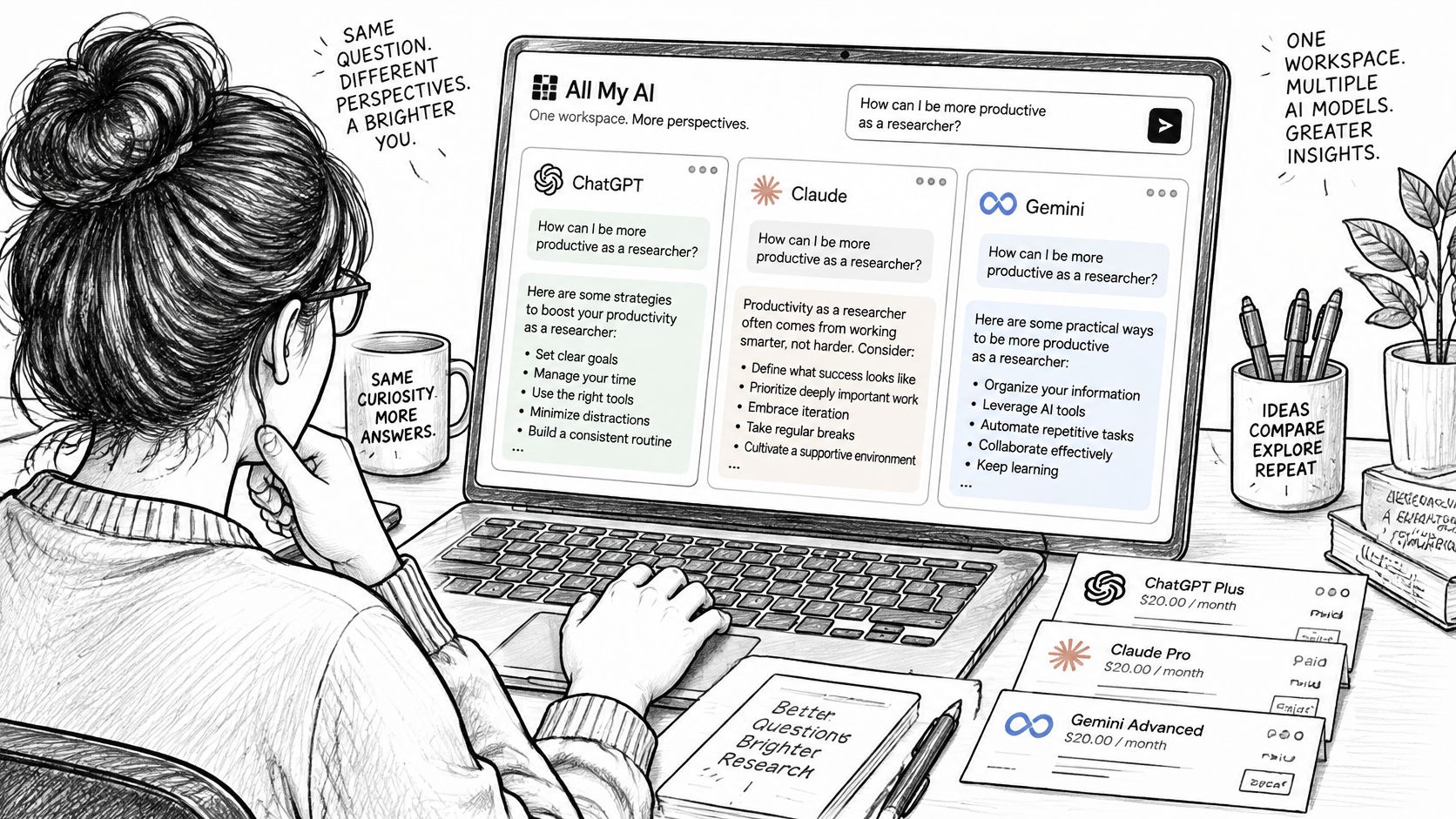
Start with a familiar workday scene. A market researcher is building a competitor brief and keeps ChatGPT, Claude, and Gemini open in three side-by-side tabs. She pays for three separate plans, pastes the same twelve-line prompt into each window, and spends fifteen minutes comparing three answers that know nothing about one another.
An AI chatbot aggregator replaces that juggling act with one interface. It connects you to several existing models, such as ChatGPT, Claude, Gemini, Mistral, and DeepSeek, through a single login and one shared conversation space.
A travel search engine for flights works in a similar way. When you search routes on a flight aggregator, the site doesn't own airplanes or run an airline. It queries airlines that already exist and puts their schedules side by side so you don't have to open six separate airline websites.
An aggregator in AI works on the exact same principle. It doesn't build a brand-new frontier model from scratch. Instead, it takes your prompt or uploaded file, sends it to an existing model provider via an application interface, and brings the answer back into your workspace.
Why People Move to One Interface
Most users don't switch to an aggregator out of curiosity about AI architecture. They switch because scattered tools waste time and money. We started BromeAI for that exact reason, after seeing people working with AI pay for three or four subscriptions that don't work together while keeping several tabs open and guessing which one to ask.
Three everyday pressures drive the move:
- Fewer recurring bills: Paying one consolidated subscription replaces juggling three or four separate provider invoices and renewal dates.
- Less tab switching: Switching models inside a single thread removes the habit of copying prompts and background context across windows.
- One home for files and history: Your uploaded PDFs, spreadsheets, and past chats stay searchable in one place rather than split across separate apps.
Consolidated access also matters far beyond teams with large software budgets. According to a World Bank working paper on generative AI adoption, 24% of internet users in high-income countries used ChatGPT, compared with 5.8% in upper-middle-income countries, 4.7% in lower-middle-income countries, and just 0.7% in low-income countries. The same paper notes that ChatGPT traffic grew 113% between April 2024 and April 2025 to reach 4.5 billion monthly visits, underscoring how fast mainstream usage is expanding even as access stays uneven worldwide.
Quick self-test: Count how many separate AI services you open during a normal workweek, and tally how many times you copy text from one chat window to paste into another. If you cross three tools or ten pastes a week, you're already acting as your own manual aggregator.
Separate Subscriptions Versus One Shared Workspace
Before digging into routing mechanics, it helps to put direct provider accounts next to a shared workspace and compare what changes on a Tuesday afternoon.
| Factor | Separate provider accounts | Shared aggregator workspace |
|---|---|---|
| Logins and bills | One account and invoice per provider | One account with consolidated billing |
| Switching models | Open another tab and re-enter context | Switch models inside the same conversation |
| Choosing a model | Guess which provider suits the task | Automatic routing or a manual model picker |
| Files across providers | Upload the same document to each service | Analyze files in one workspace |
| Conversation history | Split across several apps | Kept in one place and synced across devices |
| Data handling review | Read each provider's policy separately | Read the platform terms plus each provider's terms |
Each row in that table points to a concrete workflow difference rather than a change in raw model intelligence.
With separate accounts, billing multiplies fast because each vendor charges its own monthly fee and tracks its own renewal cycle. Switching from one assistant to another forces you to open a fresh tab and re-explain the project brief, because Provider B can't see what you just told Provider A. You also end up guessing which tool handles coding, summarizing, or structured tables best on any given morning.
Document work exposes the gap even faster. If you want two opinions on a vendor agreement, direct accounts make you upload the same PDF twice and keep parallel chat logs that drift apart by Friday. A shared workspace lets you attach files once, keep one synced history across devices, and switch models mid-thread without rebuilding context.
The Trade-Offs You Shouldn't Ignore
An aggregator isn't automatically better for every workflow, and honest evaluation starts by naming what you give up.
First, native provider apps often ship experimental features on day one before third-party APIs expose them. If your daily routine hinges on a brand-new voice mode, a proprietary desktop plug-in, or an ecosystem integration built directly into one vendor's app, a direct subscription may reach it weeks or months sooner.
Second, an aggregator introduces one more company into your data chain. Instead of reviewing only one vendor's privacy terms, you must check both the aggregator's platform policies and its contractual rules with downstream model providers.
The main advantage of an aggregator is cleaner workflow and simpler billing, not a smarter underlying model. That leaves one practical question to answer before changing your setup: which of your tasks require one specific provider's native app, and which need a reliable answer delivered with less friction?
How Automatic Routing and Model Switching Work
When you type a prompt into a multi-model platform, something has to decide which model answers. Most workspaces offer two paths: a manual model picker where you pick the engine yourself, and automatic model routing, which analyzes your request and dispatches it on your behalf.
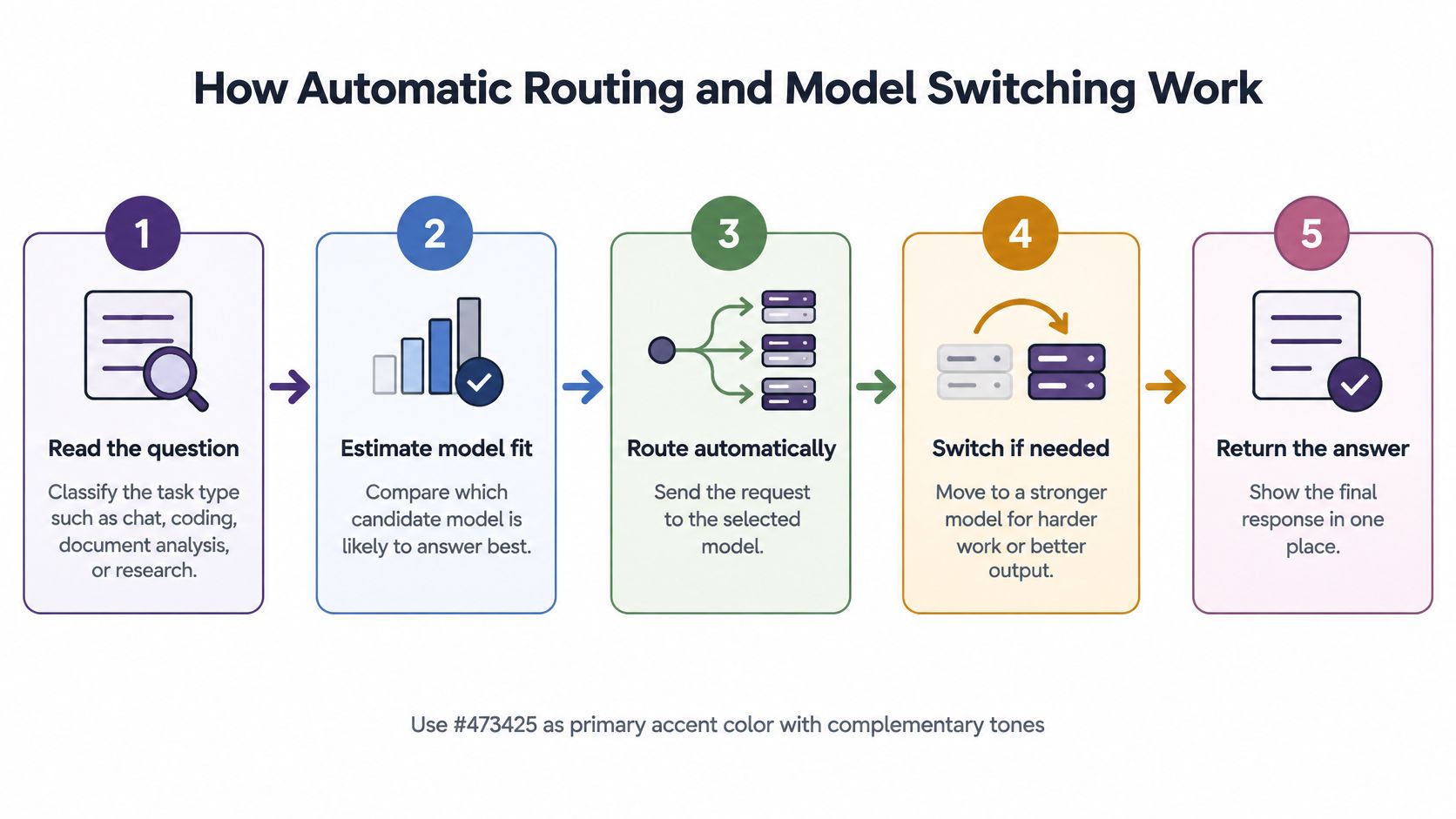
Under the hood, a well-designed routing layer works as a five-stage decision pipeline:
- Read the question and classify the task type. The router inspects your prompt and any attached files to determine whether you're asking for casual chat, code debugging, document analysis, or multi-source research.
- Estimate model performance and token cost. For each candidate model in the pool, the system predicts how accurately it can handle that task type and calculates the expected inference expense.
- Filter out models that miss hard limits. Candidates that fail minimum quality bars, violate maximum latency budgets, or fall outside your privacy settings get removed before selection happens.
- Pick the lowest-cost model that clears the threshold. Rather than sending a simple email rewrite to the heaviest reasoning model, the router picks the most economical model expected to meet the quality bar.
- Send the prompt while preserving conversation context. The platform forwards your message alongside prior turns in the thread so switching from Model A to Model B doesn't wipe the slate clean.
Manual selection acts as your safety override at any point in this loop. If you already know a particular model matches your house writing style, or if a long technical thread depends on consistent provider behavior, you pick that model explicitly and bypass the router.
Why Ensembles Beat a Single Model Ranking
Many buyers assume there's one "best" chatbot that wins every category. Routing research shows why that assumption breaks down quickly across real office work.
In an Association for Computational Linguistics paper introducing LLMRouterBench, researchers evaluated 33 language models across more than 400,000 instances drawn from 21 datasets, defining routing as assigning each query to the most suitable model from an ensemble. A related survey noted in the same publication advises testing any new routing method on at least two benchmarks, because a router that excels on one task family can still stumble badly on another.
That single insight explains why a multi-step workspace benefits from task-aware selection. Moving from spreadsheet parsing to source verification to code fixes changes what you need from a model, much like the handoffs involved in coordinating AI agents in practice, where specialized steps work better than forcing one generalist tool to do everything.
Benchmarking work from RouterBench, which spans more than 405,000 inference outcomes, evaluates routers on both answer quality and inference-dollar cost while highlighting latency and throughput as core deployment metrics. Its authors also note that stuffing more models into an ensemble brings diminishing returns compared with maintaining a carefully curated model pool.
For everyday users, the number that counts isn't the cheapest token price on a pricing sheet. It's cost per accepted answer. If a lightweight model gives you a sloppy draft that you regenerate three times before manually switching to a stronger model, that "cheap" first turn just cost you more money and time than getting a dependable response on the first try.
When Routing Helps and When It Goes Wrong
Automatic selection shines when your daily workload mixes quick lookups with heavy analytical work. Instead of paying frontier-model overhead on every trivial formatting request, a router reserves heavy compute for prompts that require it.
The peer-reviewed MixLLM study published in NAACL 2025 illustrates that upside clearly, achieving 97.25% of GPT-4's response quality at 24.18% of its cost under a defined time constraint. Yet the same study reveals how fast trade-offs appear once speed limits enter the picture. In a routing benchmark reported there, DeepSeek-V3 achieved the highest measured accuracy at 0.830 but missed a pre-registered 95th-percentile latency gate with 2,295 ms, while Qwen-2.5-3B delivered a stronger balance between latency and accuracy in that test environment.
Even strong routers make bad first calls. Unresolved engineering challenges include latency spikes, provider downtime, shifting workloads, and routing sensitivity when a prompt mixes modalities like text and tables. A 2025 ICML paper on cascade routing found that combining initial model selection with escalation to stronger models outperformed standalone routing or cascading alone in its experiments.
In plain terms, one-shot automatic choice shouldn't be a black box you blindly accept. When a fast answer looks thin on a tough question, escalating to a stronger model beats settling for a confident-sounding shortcut.
Spotting and Fixing Common Routing Failures
You don't need benchmark tooling to catch a router misbehaving in your workspace. Match what you see on screen against these recurring failure patterns:
| Symptom | Likely cause | Check or fix |
|---|---|---|
| Answers change when the wording changes slightly | Routing is sensitive to paraphrases and domain shifts | Rephrase the same request and compare the chosen model |
| Fast but shallow answer on a hard problem | A cheaper model was chosen for a difficult request | Pick a stronger model manually for that task |
| Response far slower than expected | A high-latency model was selected or a latency spike occurred | Set a latency limit or choose a faster model for time-sensitive work |
| A file appears to have gone to an unexpected provider | Routing chose a provider you did not expect | Review data settings and choose the provider manually for sensitive files |
| Context seems lost after a switch | Earlier messages were not carried into the new model | Restate key facts and confirm the workspace keeps prior messages |
| Costs rise over time with similar questions | Frequent regeneration or repeated model switching | Track cost per accepted answer for one week |
| Errors repeat across steps in a multi-step job | An early mistake carried into later stages | Review the task list and sources before approving the next stage |
Notice that fourth row in particular. Paraphrase drift or cost optimization can route a document to a provider you hadn't planned to use unless your workspace enforces strict provider eligibility rules or lets you lock the model before hitting send.
Test automatic routing on low-stakes tasks first. For any output that carries legal, financial, or technical consequences, lock in a specific model you trust or ask a second model to critique the first answer before you ship it.
Who Uses an Aggregator and for What Work
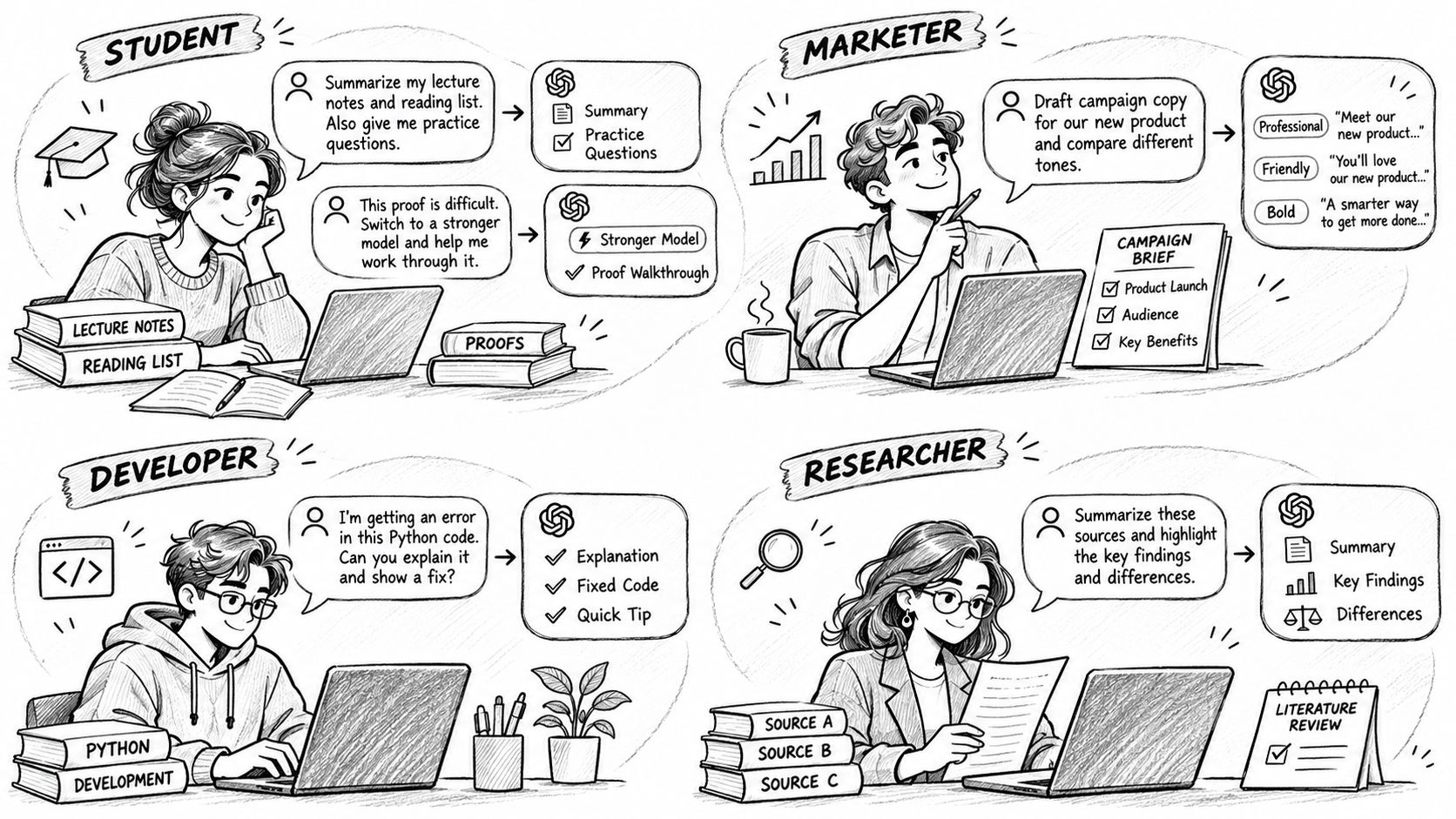
Abstract architecture only makes sense once you watch real people run messy jobs through a workspace. Four everyday scenarios show where single-model tabs stall and multi-model threads earn their keep.
Four Everyday Workflows in Action
The university student preparing for finals. Say a second-year economics student uploads forty pages of lecture notes alongside a semester reading list. She uses a fast model to condense each chapter into study flashcards and short practice quizzes. When she hits a tricky game-theory proof that the fast model fumbles, she switches to a deeper reasoning model inside the same conversation, keeping the original lecture definitions intact instead of re-uploading her notes.
The software engineer auditing a pull request. A backend developer drops a tricky authentication patch into a thread and asks one model to flag security edge cases. Before merging, she runs the exact same thread past a second model to check for race conditions and unnecessary database calls. Comparing both critiques side by side takes two minutes and surfaces a subtle token-expiry bug that only one model caught.
The policy researcher verifying a briefing. An analyst tracking energy subsidies triggers a live web search inside the workspace, gathers recent regulatory announcements, and asks the assistant to check each draft statistic against the cited source pages. Every claim stays tethered to a clickable reference list, turning a scattered afternoon of browser bookmarks into an auditable research trail.
The operations manager reconciling vendor spend. A finance lead opens a single case containing a supplier contract PDF, three monthly invoices, and an Excel budget sheet. She asks the workspace to pull out auto-renewal windows, verify net-30 payment terms against actual billed dates, and flag two line items that look like duplicate charges. You can see similar cross-document patterns across everyday multi-model use cases where text, numbers, and source checks collide in one project.
Why Multi-Step Agentic Work Changes the Math
Single prompts are only half the picture. Modern workspaces increasingly run agentic workflows that string together web search, document reading, code execution, and final drafting before returning a finished result.
In its Switchcraft research on model routing for agentic AI, Microsoft Research tested routing models that pick a model for each distinct step of an agent's work, spanning chat, tool calling, and coding. The routed system reached 78.3% answer accuracy compared with 75.6% for the strongest individual model, while cutting inference costs by 59%, equal to savings of more than $3,800 per million queries. It also logged 86.4% routing accuracy when valid abstentions were counted, with 99th-percentile routing latency of 16.7 milliseconds on an NVIDIA T4 GPU.
Commercial tools won't all match a lab benchmark, yet the underlying takeaway holds for anyone running multi-stage work. Different steps in one project reward different model strengths, and every scenario above hinges on one of three foundations: shared file context, a verifiable source trail, or the ability to hold one model steady when tone and logic must stay consistent.
Privacy and Data Handling Across Model Providers
Most aggregator reviews treat a checkbox reading "we don't train on your data" as the end of the privacy conversation. That shortcut leaves out most of the data lifecycle.
Training exclusion only tells you whether your text gets folded into a future base model. It doesn't tell you whether your supplier contract sits in application logs for thirty days, passes through third-party subprocessors, lands in overseas server backups, or gets inspected by human quality reviewers during abuse monitoring.
Users already sense this gap, even when product pages gloss over it. Survey findings reported in a privacy study on AI assistants show that more than 80% of users are concerned about how conversation data is used, roughly 60% don't know whether their assistant trains on their chats, and only 18% have paid for stronger privacy protection. The same study estimates that users value avoiding human review at $11.20 per month, nearly four times the $2.97 per month value they place on avoiding model training.
Five Questions to Get Answered in Writing
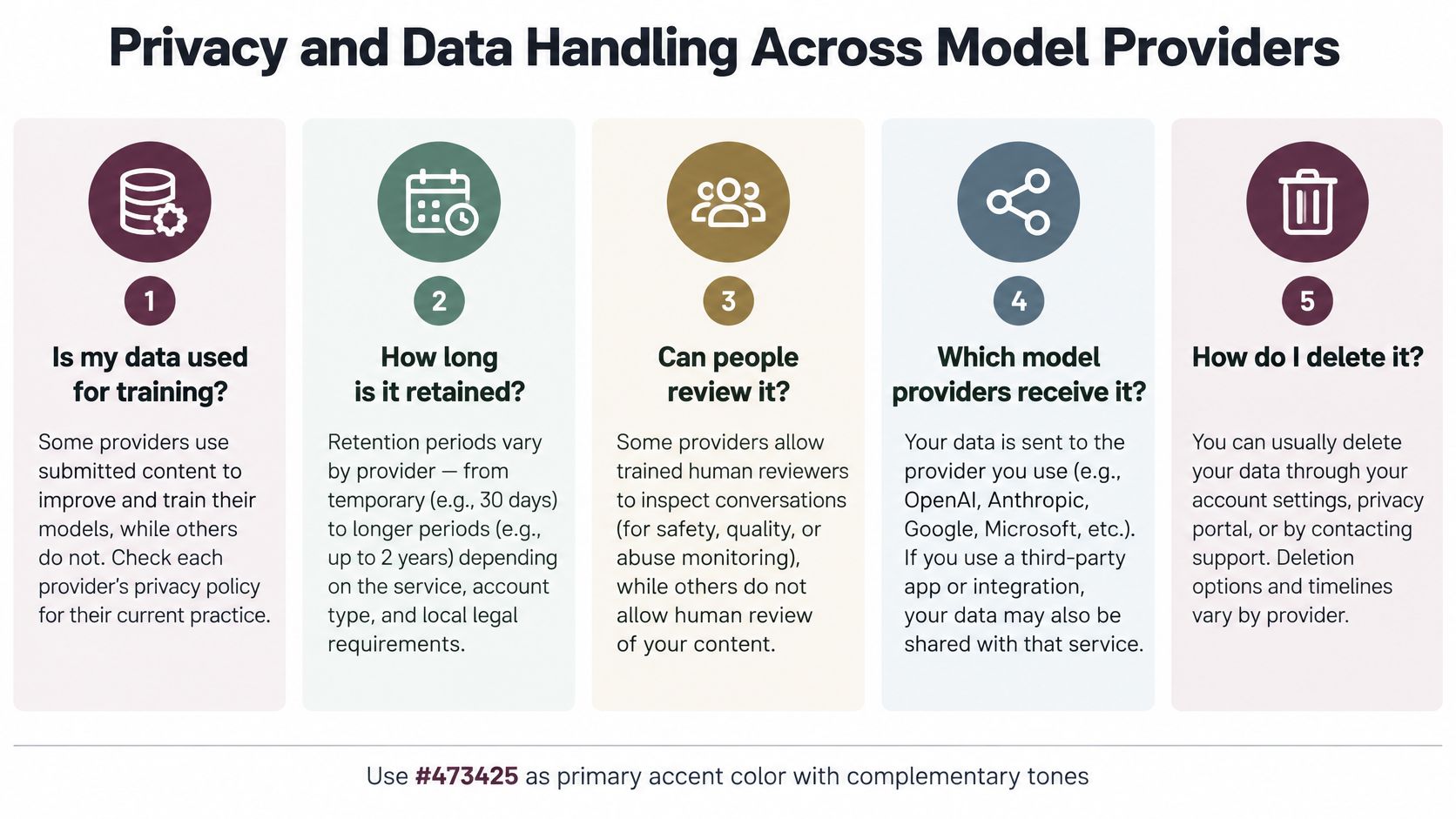
Before you upload client briefs, invoices, or student records to any multi-model workspace, demand written answers to five distinct questions:
| Question | What a clear answer includes |
|---|---|
| Is my data used for training? | Written statement on training exclusion and its scope |
| How long is it retained? | Retention periods for chats, uploads and logs, plus backup timelines |
| Can people review it? | Whether staff or subprocessors can read content, and under what conditions |
| Which providers receive it? | Named model providers and the routing path a file can take |
| How do I delete it? | Self-service deletion, deletion timelines and what remains afterwards |
Notice how question four connects directly to automatic routing. If a workspace routes your PDF to Model A for extraction and Model B for summarization, your document just traversed two external providers unless the platform restricts routing paths or enforces uniform retention agreements across every endpoint.
What Regulatory Standards and Real Safeguards Look Like
European privacy regulators set a clear baseline for how organizations must govern AI data pipelines. Guidance from the Spanish Data Protection Agency on GDPR compliance in AI processing explains that the right to erasure demands a proactive framework from the data controller, including scheduled dataset reviews and clear timelines for deleting information once it's no longer needed for its stated purpose.
For AI training specifically, the agency states that collected datasets must be cleansed so unnecessary personal data is stripped out, and removed once training finishes unless legally required for fine-tuning, assessment, or another compatible GDPR purpose. It also clarifies that erasure requests call for a case-by-case review, since the right isn't absolute.
Those standards explain why contractual provider agreements matter as much as front-end settings. At BromeAI, we are GDPR compliant, maintain zero data retention agreements with every AI model provider we work with, and keep conversations excluded from model training. Before trusting any platform with sensitive documents, inspect its privacy policy and data-handling commitments yourself, paying close attention to hosting jurisdiction, backup expiry, and deletion controls.
Redaction rule for sensitive files: Strip out personal names, bank or account numbers, salary rows, and client identifiers before uploading any contract or spreadsheet into an AI workspace, and keep the unredacted original strictly inside your own storage system.
Test an Aggregator on Your Own Work This Week
Marketing benchmarks won't tell you whether a multi-model workspace saves you time on your actual spreadsheets, codebases, or research notes. A disciplined two-week trial will.
Run this five-step check before canceling any existing subscription:
- List your five most common weekly AI tasks. Write down concrete jobs you repeat, such as summarizing board packets, debugging SQL queries, or drafting client follow-ups.
- Test automatic routing against manual selection. Pick one aggregator and run three of those tasks twice, once letting the router pick the model and once choosing your preferred model manually.
- Score the outputs. For every run, jot down whether the answer was usable, how many minutes you spent getting there, and how many regenerations it took.
- Audit the data controls with a safe sample file. Upload one non-sensitive document, then verify the workspace's written retention window, provider routing list, and self-service deletion button.
- Calculate your real cost per accepted answer. Put the aggregator's monthly fee and your saved minutes side by side against the combined cost of your separate provider subscriptions.
If you want to run that trial inside a single conversation history, BromeAI brings ChatGPT, Claude, Gemini, Mistral, and other AI models together in one European platform. It's available on web, iOS, and Android with synced threads, so you can kick off a test prompt on your laptop at work and review the follow-up on your phone later.
Whichever vendor you evaluate, confirm current model availability, pricing tiers, and contractual data terms directly on the provider's own pages before committing. Let the results of your two-week log make the final call. If separate direct accounts outperform a shared workspace on your specialized tasks, keep them, and use an aggregator specifically where consolidated access cuts tab switching and trims your monthly software bills.
Ready to see how one workspace handles your daily prompts without bouncing between browser tabs? BromeAI combines leading models like ChatGPT, Claude, Gemini, and Mistral with automatic model routing, manual mid-thread switching, and GDPR-compliant zero-retention agreements across every provider. Visit BromeAI to explore the workspace and run your own side-by-side test.