Using AI for Data Analysis: How to Prepare and Verify
You exported last month's sales file late in the afternoon, pasted a short prompt, and got a tidy paragraph about which products are slipping. The chart looks clean. The percentages look precise. Then a colleague asks which rows went into the rate, and you cannot point to a script, a snapshot, or even the exact file you uploaded.
That is the moment when using AI for data analysis stops feeling like a shortcut and starts feeling like a claim you have to defend. A fluent summary is not the same thing as a result someone else can rerun next Tuesday. The workflow below treats every model output as a claim that needs an audit trail, a reviewer, and a sign-off, not only a fast answer.
You do not need a new stack to begin. You need a dated file, a written question, code you can execute, and a person who owns the interpretation. The checks that follow are the ones you would walk a colleague through before any number leaves the team.
Table of Contents
- Which Analysis Stages to Hand to AI
- Privacy Checks Before Uploading Business Data
- How to Prepare Your Data Before Prompting
- Prompting AI to Write Code Instead of Conclusions
- Checking AI Results Before You Trust Them
- Where AI Analysis Should Stop and Experts Take Over
- Run One Recurring Report Through the Workflow
Which Analysis Stages to Hand to AI
Teams often hand the model the judgment and keep the typing. That split is backwards. A model is useful on mechanical stages, such as fixing types, drafting a join, or sketching a first chart. It is weak at deciding what counts as evidence.
A Federal Reserve Bank of St. Louis analysis reported that 28% of workers used generative AI at work to some degree. Among those users, 33.0% said it saved them one hour or less in the previous week. The same analysis estimated a 1.1% increase in aggregate productivity, and that workers were, on average, 33% more productive during the hours they used generative AI. Those figures are self-reported, so they are not a promised return. They still show where the hours go. The gain sits in extracting information, organizing data, and drafting summaries, not in replacing the analyst.
Finance teams already live with this split between calculation and judgment. A practical companion is this guide to using analytics to guide financial decisions, which keeps the call with the person who owns the numbers.
Analysis stages and who does what
| Stage | AI can draft | Person must confirm |
|---|---|---|
| Data cleaning | Type fixes, deduplication and filter code | Cleaning rules match the source system |
| Code drafting | Scripts for joins, aggregation and tests | Code runs on a snapshot and matches the stated question |
| Charts and summaries | Chart code and plain-language summaries | Axes, totals and labels match the underlying numbers |
| Statistical tests | Test choice and code | Assumptions hold and the right test was used |
Each row should leave an artifact a reviewer can open. That might be a cleaning script, a dated output file, or a short list of assumptions beside a test. A chat paragraph alone gives you nothing to audit.
Working rule: If a second person cannot rerun the step from a saved file, the step is not finished.
Before you open a tool, sort two or three of your own recurring tasks into that table. Put "draft the join" on the model side. Put "confirm the grain of the data" on yours.
Privacy Checks Before Uploading Business Data
A spreadsheet of invoices, contracts, or customer notes is not a toy file. Before it leaves your organization, write down five checks and keep the answers with the project folder, next to the scripts and snapshots a reviewer will open later.
Training use. Confirm that conversations and files are excluded from model training. We do not use users' conversations or files for AI training.
Retention and processors. Record how long material is kept and which providers touch it. We hold zero data retention agreements with every AI model provider we work with.
Hosting location. Name the region where the data sits. Our user data is hosted in the European Union, and the platform is GDPR compliant.
How deletion works. Note what you can remove yourself inside the product and what requires a written request to the provider. Read the service's published deletion terms before upload, because those terms, rather than the button itself, define what a delete action removes.
Exceptions that can delay erasure. A legal duty or an open claim can keep a copy even after you ask for deletion.
The European Commission explains that a person may request erasure when data is no longer needed or when it was processed unlawfully. The right is not absolute. Exceptions can apply for freedom of expression and information, compliance with a legal obligation, or the establishment, exercise, or defense of legal claims. Article 17 of the General Data Protection Regulation requires a controller to erase personal data without undue delay when an applicable ground exists, including when the data is no longer necessary for the purpose, consent has been withdrawn without another legal basis, or the processing does not comply with the regulation.
What a delete button does not promise
Deletion works like offboarding a contractor: revoking access is one step, and accounting for what was already copied is another. A button in a chat window covers the first part. What it cannot show you is how the second part is handled, which is why the written terms matter more than the interface. A credible setup publishes plain language describing what a delete action covers and what a formal request can reach. Read those terms for any service you use, including ours, before a live customer file goes up.
Our AI workspace guide walks through how files sit inside one shared workspace, which is the right moment to match the written checks above to the product you open.
Before upload, remove or pseudonymize names, bank details, and other personal identifiers. Keep the dated snapshot from your preparation routine in storage your own team controls. The model should see the columns it needs for the question, not a full dump of people.
A file you would not email to an unknown vendor should not be pasted into a prompt either.
How to Prepare Your Data Before Prompting
Preparation is what makes a later result reproducible. Skip it and the model will still answer. You just will not be able to show where the answer came from.
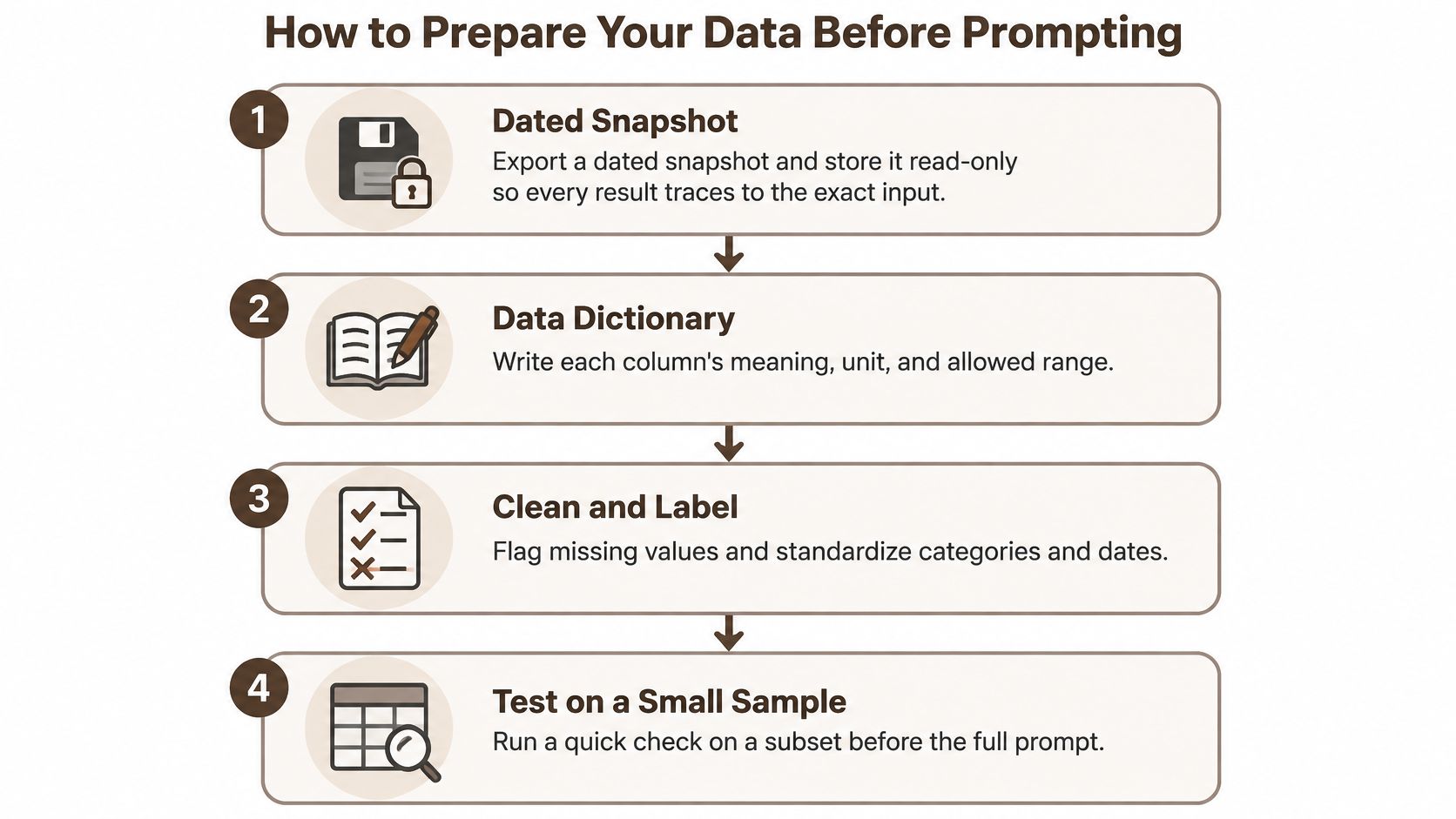
- Export a dated snapshot and store it read-only. Copy the source file, stamp the date in the name, and stop editing that copy. Without it, you cannot reproduce last month's figures after someone refreshes the live export.
- Write a data dictionary. For each column, record the meaning, the unit, the type, and the allowed values. A column called revenue may be in thousands in one file and in euros in another. Skipping the dictionary is the usual reason units go wrong.
- Run a schema check. Look for duplicate keys, mixed date formats, and numbers stored as text. Say a customer id appears twice with different regions. Fix the rule in writing before any prompt, or the join will double the sales.
- Count missing values per column. Note whether blanks look random or structural. A blank discount field often means no discount was applied, not that the value is unknown. Treating every blank as "missing at random" will bias a rate.
- Write the question in one sentence. Name the population, the time window, and the outcome. "Churn among paid subscribers in Q1, defined as no invoice in the following 30 days" is a question. "What is going on with customers" is not.
- Set aside a labeled sample of 50 to 200 rows with known answers. You will use it to test the output later. If you only ever run the full file, a wrong denominator can hide inside a large total.
If the source is a PDF statement or a photo of a paper invoice, convert it to text before you trust a column. This comparison of ways to compare PDF and photo extraction methods is a useful check on how much error the conversion itself can add. Once the file is a real table, the same snapshot and dictionary rules apply. Our notes on spreadsheet data analysis cover how an uploaded workbook is questioned against its own sheets.
Clean preparation looks boring, which is the point. You finish with a snapshot, a dictionary, a count of problems, and a written question. The prompt comes after those four artifacts exist, not before.
Prompting AI to Write Code Instead of Conclusions
Ask for an executable script, an analysis plan, and a list of assumptions. Do not ask the model to stare at a table and declare the trend. A prose answer leaves nothing to audit when the wording changes or the model is updated.
A prompt works better as four blocks.
The question names the population, the treatment or input, the outcome, and the time window. The dictionary is attached or pasted, including units. The deliverables are an analysis plan, executable code, and the assumptions the code relies on. The constraints fix the random seed, name the software versions, and require the test name whenever a p-value appears.
A weak prompt and a strong one
Say you are looking at retail churn. A weak prompt says, "Which customers will leave?" The model may reply with a confident paragraph and a made-up ranking. You cannot rerun it, and you cannot see the denominator.
A strong prompt says, "Write a Python script for paid retail customers in 2024. Compute monthly churn by signup cohort. Write an output table. Report the denominator used for each rate. Fix the random seed. Name the library versions. List every assumption, including how a cancelled account is dated."
The usual slip is leaving out the unit of analysis. Fix it in the question itself. Say "one row per customer per month" or "one row per order." If the grain is vague, the model will aggregate at whatever level makes a smooth chart.
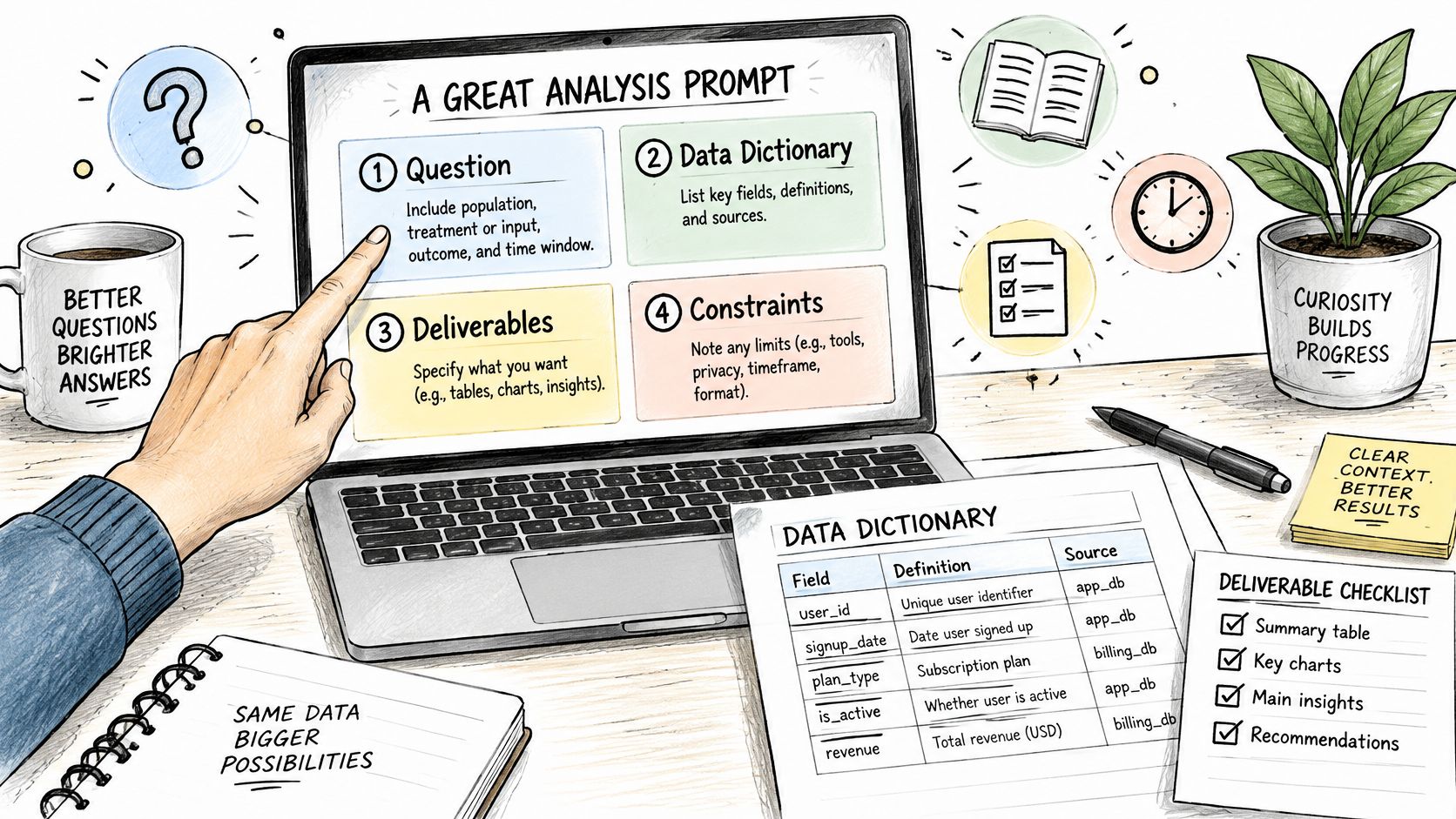
Reuse this checklist on the next job.
- Question block: Population, input, outcome, and time window are all named.
- Grain: The row level is explicit, such as one row per customer per month.
- Dictionary: Units, types, and allowed values are in the prompt, not implied.
- Artifacts: You asked for a plan, runnable code, and an assumption list.
- Constraints: Seed, software versions, and the test name beside any p-value are required.
Save the prompt text next to the script. A result you cannot tie back to those five lines is a story, not an analysis.
Checking AI Results Before You Trust Them
A reviewer runs the same six checks on every output before anyone quotes it.
Output checks and their red flags
| Check | What to compare | Red flag |
|---|---|---|
| Row counts | Source rows against rows after joins and filters | Unexplained gain or loss of rows |
| Totals | Output totals against an independent sum from the source | Mismatch larger than rounding error |
| Denominators | Percentages against the population they describe | Rates computed on the wrong base |
| Units | Currency, scale and date units against the data dictionary | Values or headers that conflict with the dictionary |
| Repeat run | Same code and random seed run twice | Different numbers between runs |
| Baseline | AI result against a trusted spreadsheet or prior report | Gap that no one can explain |
Why a single score is not enough
A high score on a fixed quiz does not mean the same script will hold on next month's file. NIST notes that benchmark accuracy measures performance on a fixed item set, whereas generalized accuracy concerns the broader population of similar items. Stratify your own results by data type, missingness, and subgroup. Report a confidence interval or a bootstrap interval, not one naked figure.
Separate first-attempt correctness from correctness after you paste an error back to the model. A number that appears only after several corrections needs a closer look. The model may be fitting your hints rather than the data.
Watch three mechanical failures in particular. Leakage between a training slice and a test slice makes accuracy look better than it is. A join that duplicates keys inflates totals. A rate on the wrong denominator, such as all visitors instead of paid accounts, can reverse a conclusion. Commerce teams hit the same traps in platform reports. This guide to checking BigCommerce report numbers shows how a stored total and a freshly computed total can disagree for ordinary reasons, which is the habit you want on AI output too.
Run the generated code in a controlled environment with pinned library versions. Do not point it at a live production database. Then rerun under an alternative specification, and add a negative control where you have one, such as a period where the treatment could not have acted. If the result flips when you change one arbitrary choice, say so before you report it.
No AI-produced number leaves the team until it matches an independent baseline, or the gap is explained in writing.
If you later turn the checked tables into a narrative, keep the script attached. Our note on how to generate a report is about that handoff, not a substitute for the six checks.
Where AI Analysis Should Stop and Experts Take Over
A model will happily say a spring campaign caused a 12% uplift. A marketing manager who knows the calendar can see the hole. Easter moved, a discount ran in only one region, and the "control" stores were already growing. The comparison is not a cause. The sentence still sounds like one.
That is the failure mode to plan for. Descriptive work can stay with the model under review. Cleaning, summarizing, charting, and drafting code are in that group. High-risk claims are not.
High-risk claims need a named person:
- Causal claims. "This campaign caused the change" needs a design, not a chart.
- Subgroup fairness. A gap by region, age, or contract type is not a finding until the grouping is justified.
- Clinical or financial decisions. A threshold that changes treatment, credit, or pay is a decision, not a summary.
- Extrapolation. A forecast past the observed window is a scenario until someone owns the assumption.
Before anyone acts, a domain expert checks the data-generating assumptions, the confounders, the uncertainty interval, the missingness mechanism, and at least one alternative explanation. Seasonality, selection into the treatment, and a changed definition of the outcome are the usual alternatives. If none of them was written down, the claim is not ready.
The model is not the accountable decision-maker. If an AI-assisted conclusion causes harm, the organization remains responsible for validation, documentation, and escalation. Keep a short log. Who reviewed the claim, on what date, and what they refused to sign. That log is the artifact, the same way a script is the artifact for a join.
Speed is not the test here. A slower, inspectable conclusion beats a confident one that nobody can defend.
Run One Recurring Report Through the Workflow
Choose one report whose answers you already trust, such as last quarter's sales summary or a monthly invoice reconciliation. Do not start with the messiest file you have.
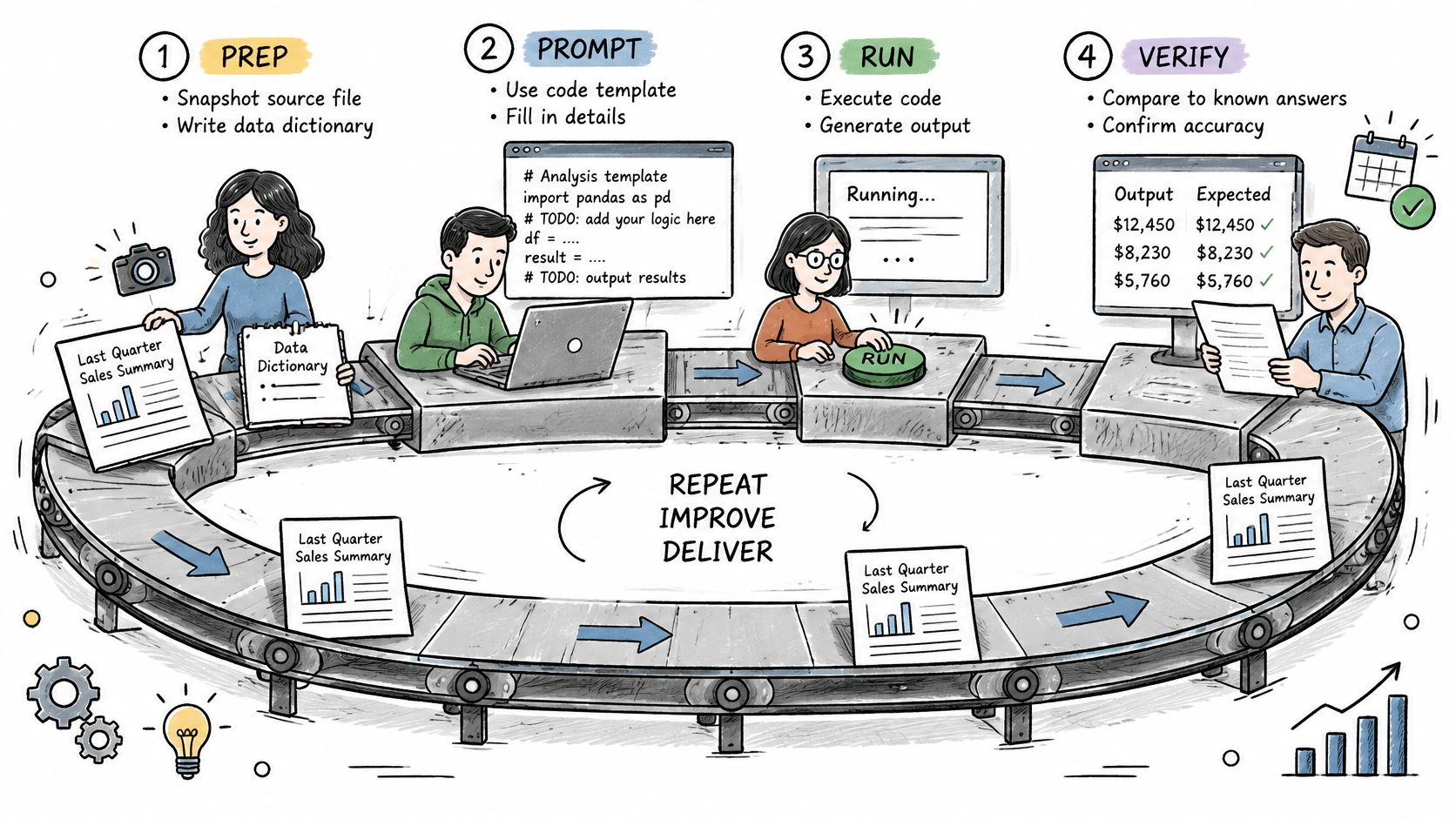
- Prepare. Build the dated snapshot and the data dictionary first.
- Prompt for code. Use the four-block template, not a request for a verdict.
- Check. Run the six output checks against the known baseline.
- Log the run. Save the prompt, model name and version, sampling settings, and random seed.
- Record every gap between the new figures and the prior report.
Go only if the pilot matches the baseline within rounding and every high-risk claim has a named reviewer. Extend to a second report only after a go. A no-go means you fix the weakest stage before you add scope.
When you compare models, run the same labeled sample through each one and record which model produced each result. We bring ChatGPT, Claude, Gemini, Mistral, and other models together on one European platform, and an agentic run can attach the sources from a live web search so you can check them. The input stays fixed. Only the model changes.
BromeAI is a European workspace where you can question spreadsheets, PDFs, and notes with more than one model, while your conversations and files stay out of model training. Use it to draft the code, keep the sources attached, and leave the sign-off with your own reviewer. Visit BromeAI when you are ready to run the next recurring report through that trail.