How to Generate a Report with AI from Your Sources
The draft lands at 4:40 on a Thursday, fourteen pages long, with a summary that reads as if the quarter has already been decided. You asked for a report on churn. What you got is a document that will take longer to check than to write from scratch.
That trade is the whole problem. Drafting speed stopped being the bottleneck. 54.6% of U.S. adults aged 18 to 64 reported using generative AI in 2025, a 10-percentage-point rise over the previous year, according to the Federal Reserve Bank of St. Louis. Output volume rose. Review capacity didn't.
So the question worth asking isn't which tool writes the smoothest prose. It's which workflow leaves every claim, number and file traceable in the hour you have. What follows is the version I'd hand a new analyst on day one, because the verification effort is the product, not the polished draft.
Table of Contents
- What a Generated Report Must Contain
- Deciding Which Sensitive Files Can Enter the Workflow
- How to Generate a Draft Step by Step
- Keeping an Audit Trail Someone Else Can Rerun
- Verifying That Each Source Supports Its Claim
- Checking the Numbers Before the Report Goes Out
- Confirming the Report Is Ready to Share
What a Generated Report Must Contain
A model handed "write a report on our churn problem" has no way to know what belongs where. It produces a smooth essay with headings, which is not the same thing. A model handed seven named sections plus the material each one needs produces a document a reviewer can check line by line.
Business research runs on a small set of report types: market research, industry, country, outlook, surveys and dossiers. Each one rests on data that's collected, organized and interpreted, and government series such as unemployment counts and birth registrations often anchor the analysis, as the San José State University business data guide sets out. The same guide notes that a single database can hold more than 1 million statistics across retail, transportation, technology, media and telecommunications.
That scale is the argument for a fixed skeleton. Raw observations become evidence only after they're defined, measured, checked and summarized. Without named sections, the checking has nowhere to sit.
Report skeleton and the material each part needs
| Section | Reader question it answers | Material the model needs |
|---|---|---|
| Summary | What did we find and what should happen next? | Decision question and the two or three findings |
| Scope and method | What was included and over which period? | Source list, date range and inclusion rules |
| Findings | What do the sources show, in order? | Extracted facts tagged with source IDs |
| Metrics | How were the numbers produced? | Numerator, denominator, period and missing-data rule |
| Limits | Where could this be wrong? | Known gaps, conflicting sources and stated uncertainty |
| Recommendations | What should the reader do? | Options tied to findings, with no new facts |
| Appendix | Can someone reproduce this? | Prompts, source list, data files and version log |
Why the summary is written last even though it comes first
Readers open at the summary. Drafting has to end there, because a summary can only compress what the findings support. Ask for it first and the model invents a conclusion, then bends the middle sections to fit. Draft the middle, confirm the numbers, and the summary almost writes itself from material you've already verified.
Keep observations and conclusions in separate rooms. A number lifted from a source belongs in findings. A judgement about what that number means belongs in recommendations, where a reviewer can argue with it without re-checking the arithmetic. Teams that compare test execution report formats hit the same appendix problem, since a test run without its environment and version log can't be reproduced either.
Before you write a word of the brief, pick one report type and one decision question, both in a single sentence. "Should we renew the enterprise support contract at the current price?" controls scope, findings, metrics and recommendation at once. "Insights about support" controls nothing.
Deciding Which Sensitive Files Can Enter the Workflow
One prompt can send a payroll extract through three providers in three countries. The key sorting question is what the file is, and who is harmed if it leaks. Trust in the tool comes second. The discomfort is measurable. Among workers in finance and manufacturing, 62% and 51% respectively worried about privacy in connection with workplace data collection, and 58% and 54% worried that too much data was being collected, according to OECD work on AI and work. Beyond the workplace, people stay uneasy about AI however the data-sharing terms are worded, and assurances that data will sit on a company's own servers barely move them.
Those are two different anxieties. The first is about collection. The second is about control, and no privacy statement settles it, because a statement describes intent while the risk lives in the routing.
Decide what is allowed to travel before you find out where it went.
Controls to apply before the upload
- Minimize first. Remove every column the report does not need. A churn report rarely requires customer names or account numbers.
- Redact at the file level. Replace party names, bank details and unit prices with stable tokens such as Client_A, so the model can still reason about structure.
- Set a retention limit. Decide the deletion date before uploading, and write it next to the case.
- Check the training clause. Confirm whether inputs may be used to improve models, since "secure" and "used for training" are separate questions.
- Confirm hosting and deletion. Know which region processes the file and whether you can delete it yourself.
Deletion is a process, not a button. Under the GDPR, a person can ask for erasure when data is no longer necessary, when processing was unlawful, when consent is withdrawn with no other legal basis, or after a successful objection, as the European Data Protection Board's rights guidance explains. The Board also sets a hard clock: a controller must respond no later than one month after receiving the request, extendable by up to two further months for complex or numerous requests, with the reason explained inside that first month, per the EDPB's questions page. Retention can still override erasure for legal obligations, research or legal claims, which is why the call belongs in a documented framework: record what entered the workflow, who approved it and when it must be deleted, so a second person can check the decision later.
Upload rules by material type
| Material | Upload to a model? | Required control |
|---|---|---|
| Public web pages | Yes | Keep the source link and retrieval date |
| Internal research notes | Only after review | Remove names and internal project codes |
| Customer records | Avoid by default | Aggregate or pseudonymize before uploading |
| Contracts and invoices | Only after reading the provider terms | Redact party names, bank details and prices not needed |
| Regulated data such as health or payroll | Not unless compliance has approved the workflow | Separate workflow with audit logs and human approval |
Teams juggling several subscriptions lose track of which file sits where, and a shared AI workspace cuts that sprawl by keeping material and conversation in one case. Whatever you use, keep a human approval step in front of anything regulated, and keep the classification notes with the report so the audit trail shows why each file was allowed in.
How to Generate a Draft Step by Step
Seven steps, in this order. Each one exists because skipping it produces a failure that costs more to fix later than to prevent now.
Here's the sequence in one view, from labeled inputs to a draft you can defend.
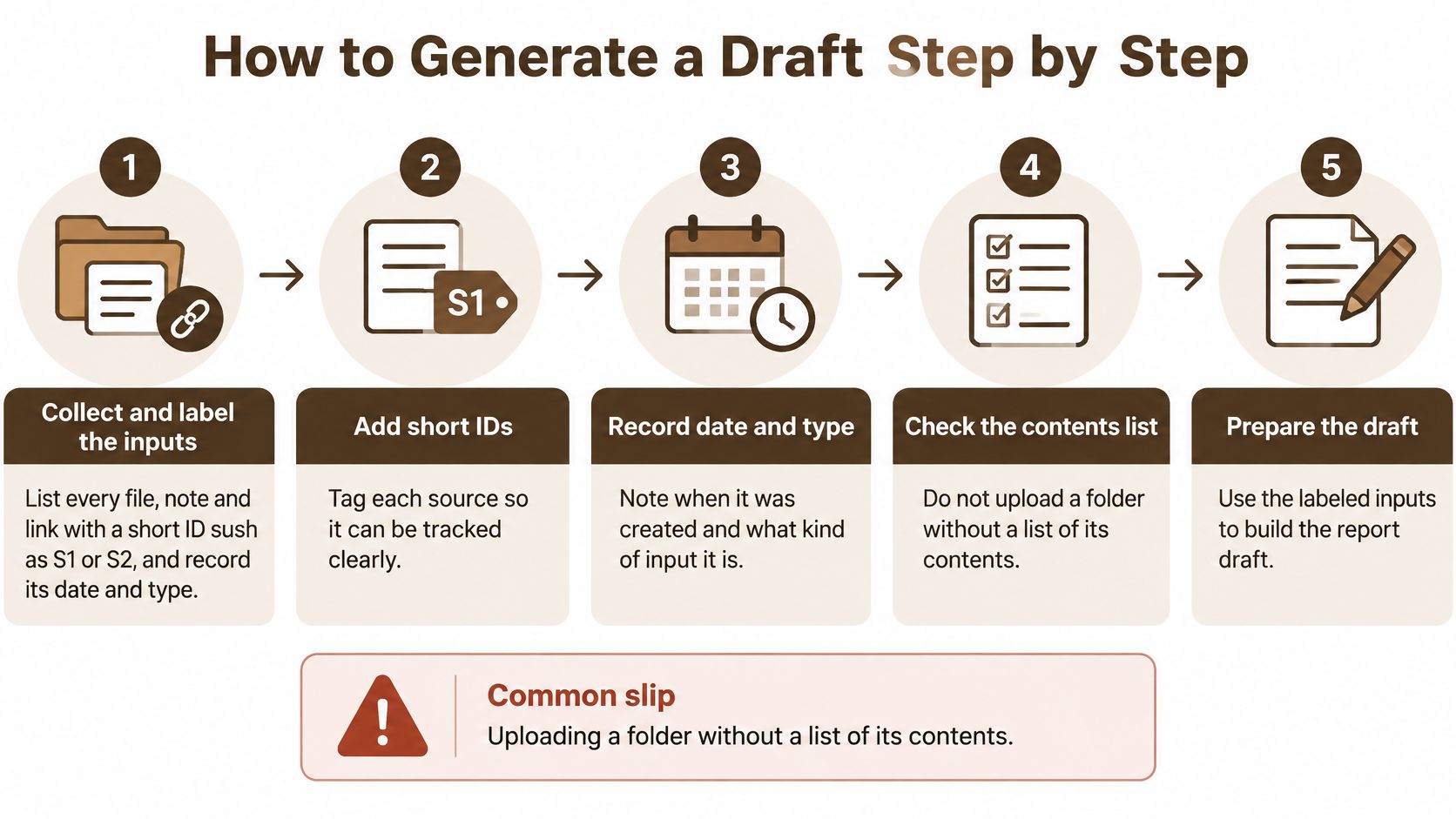
Collect and label the inputs. Give every file, note and link a short ID such as S1 or S2, and record its date and type next to it. The ID is what makes citation possible three hours later. The common slip is uploading a folder with no contents list, which leaves the final draft full of claims nobody can trace back.
Write the decision question plus the action. One sentence for the question, one for what the reader does after reading. Asking for "insights" with no decision attached gives the model no endpoint, so it writes until it runs out of steam.
Build the outline and attach source IDs to each heading. Every heading should list the IDs that answer it. If a heading has no matching source, delete it or go find the source, because otherwise the model fills that space with generic filler that reads plausibly and means nothing.
Draft one section at a time. A prompt that works: 'Using only sources S1 to S4, write the Findings section. Tag every claim with its source ID and write NO SOURCE where a claim has none.' The slip to avoid is a single long prompt covering all seven sections, which blends sources and drops attributions.
Ask for the claims that no source supports. Then cut each one or find a source for it. Treat the model's list as a first pass rather than a complete audit, because it rarely catches all of its own errors.
Check every section against its job. Findings holds no recommendations. Recommendations introduce no new facts. A recommendation that smuggles in a fresh statistic is the most common failure in AI-drafted reports, and it survives casual review because the number looks like all the others.
Export with the source list and prompt log attached. A healthy draft is one where every paragraph traces to a source ID. If that isn't true, the fault almost always sits back at step 4.
What good looks like: an agentic workspace that breaks the job into a visible task list before anything runs, then returns the sources it used once every task is done, turns steps 1 to 4 into a review rather than a typing exercise. You approve the plan, not the prose.
Keeping an Audit Trail Someone Else Can Rerun
Start the trail before collection begins. Write the scope, outcome definitions and inclusion rules with a timestamp, then either keep them unchanged or log every edit with a reason. Export your source list or search results as a file, and record the deduplication rule you applied, because a rule nobody wrote down is a rule nobody can reproduce.
The evidence for this is blunt. A cross-sectional metaresearch study found that only 47 searches, or 10.4%, could be reproduced within 10% of the original result count, while six differed by more than 1,000%, as reported in the publication on reproducible search reporting. Reports inherit that fragility. If your source set can't be rebuilt, neither can your finding.
What belongs in the folder
- Raw data, untouched. One file, never edited in place.
- Cleaned data, separate. With a note on every transformation applied.
- The analysis code or spreadsheet formulas. Whatever produced each figure, saved alongside it.
- The prompt log. Exact wording, model name and version, date and any assumptions you supplied.
- A source-to-claim matrix. Every claim in one column, its source in the next, the location in the data in the third.
Have a second person audit a sample of exclusions and extracted values, not just the finished text. Readers judge a report by its prose, so a reviewer who only reads the prose will miss the denominator that changed between drafts. Teams that already care about documenting who changed the numbers will recognize the discipline.
Keep the prompt that produced the draft. A reworded prompt written a month later generates a different report, and you'll have no way to tell whether the difference came from new evidence or new phrasing.
Verifying That Each Source Supports Its Claim
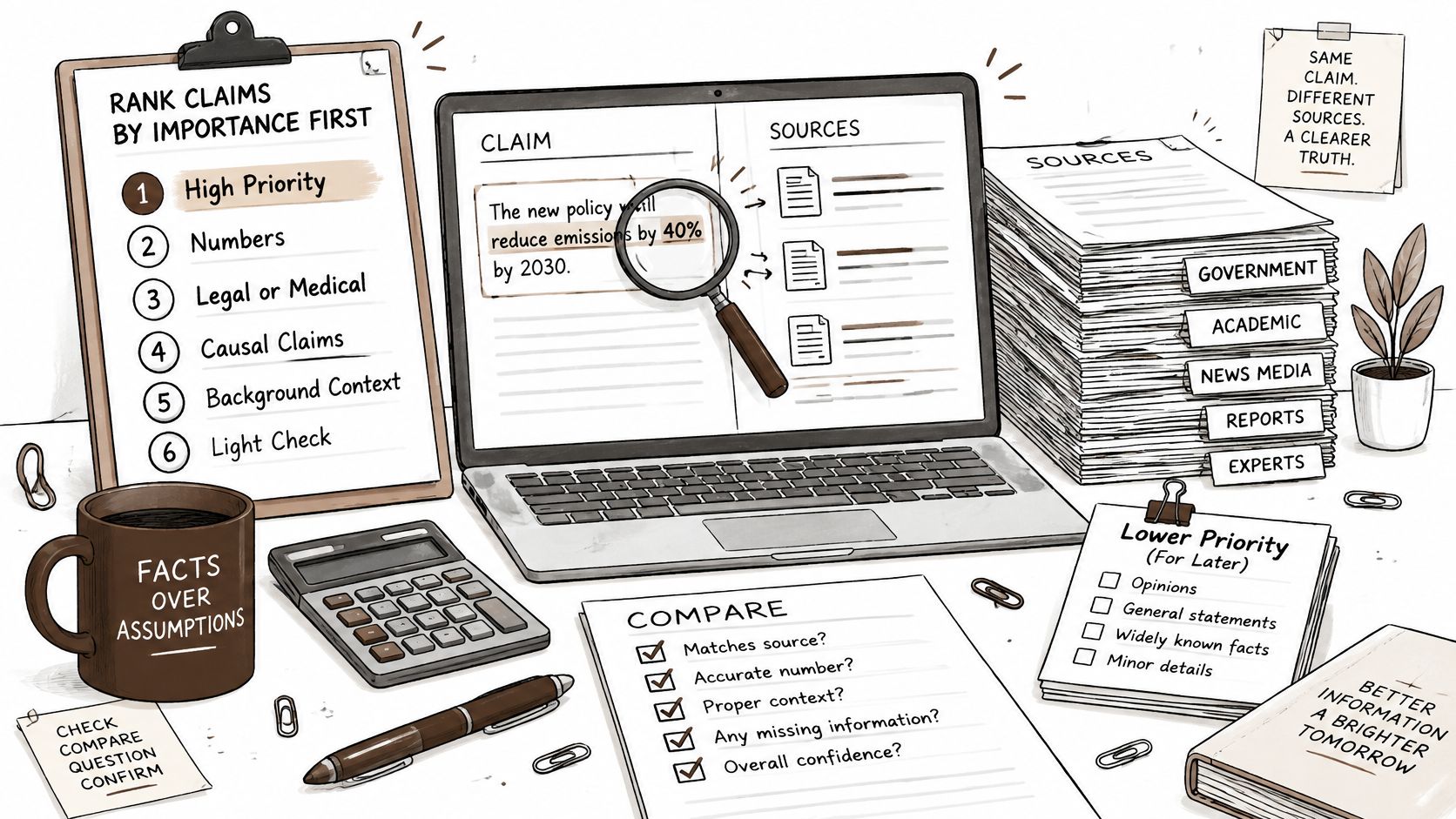
Sort claims before you check a single one. Numbers, legal or medical statements, causal claims and anything a decision rests on get a full check. Background context gets a light one. Checking everything equally means the important claims get the same thirty seconds as the trivia.
Then run the routine on each high-importance claim. Open the cited source. Find the sentence that supports the claim. Compare its wording with what the source measured. A real citation can still say something weaker than the report claims, and a source that merely mentions the topic is not proof of the point.
The gap between citing and checking is wide. In one recent study, 87% of researchers said they always verify AI-generated citations, yet 41.5% reported copying BibTeX without checking it, and 76.7% of reviewers said they do not thoroughly check reference lists, as reported in the analysis of AI citation verification behaviour. Every report review has that same 41.5% problem inside it.
The open, compare, date, flag routine
Record each source's publication date and its stated limitations. Search for at least one source that disagrees with any major claim, because a claim resting on a single source is a claim waiting to fail. Flag unsupported or conflicting findings in the draft instead of smoothing them over, since a visible flag is a decision for the reader while a silent patch is a hidden risk.
Per-claim source checks
| Check | Pass test | Red flag |
|---|---|---|
| Citation exists | Source opens and matches title, author and date | Link is dead or the title cannot be found |
| Claim matches source | The source states the finding the report attributes to it | Source only mentions the topic |
| Source is current | Publication date fits the period the question asks about | Figures older than the period under review |
| Limitation stated | Sample, population or method is named in the source | Causal wording used for observational data |
| Conflicts checked | At least one other source was searched for disagreement | A major claim rests on a single source |
Tools that keep the link between answer and file make this fast. In document analysis, each element of an answer stays attached to the file it came from, which is how BromeAI handles it, so opening the passage is one click rather than a hunt through a folder. If you want the longer version of this discipline, there's a useful walkthrough of how fact-checking works when the source is a model's own output.
The rule I apply: a report's quality is the number of claims a stranger could re-verify in an afternoon, not the number of pages it fills.
Checking the Numbers Before the Report Goes Out
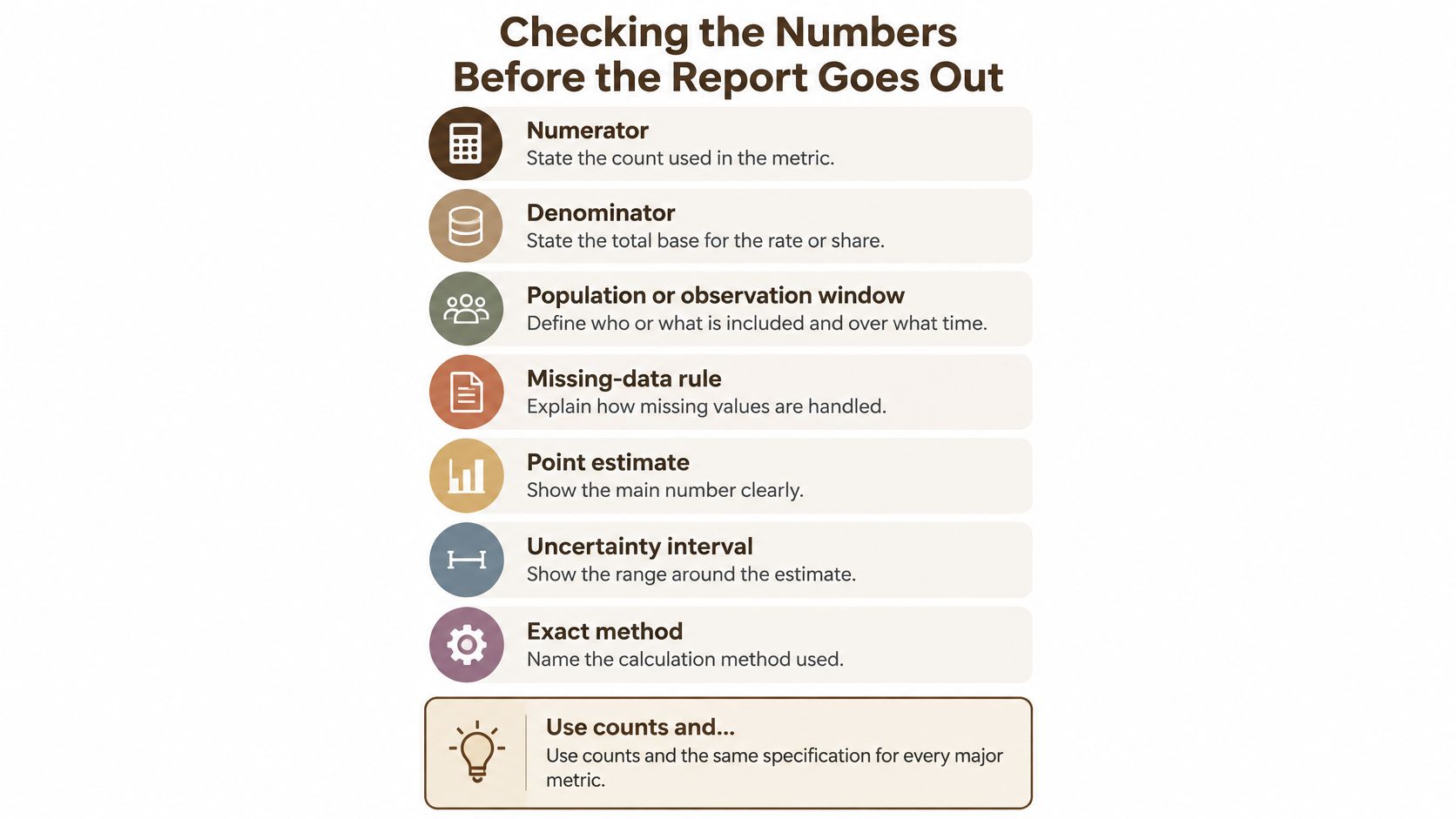
Give every major metric the same specification, every time: numerator, denominator, population or observation window, missing-data rule, point estimate, uncertainty interval and the exact method. For yes or no outcomes, report event counts and sample sizes. For continuous outcomes, report means, standard deviations and sample sizes. The reporting guidance behind this sits in the review of statistical reporting standards, and it exists because a figure without its base is an opinion with a decimal point.
Then run a validation pass. Recompute each percentage from the counts printed in the report. Check that denominators stay consistent across sections. Confirm that rounding doesn't change a ranking. Add up the subgroups and see whether they reconcile with the overall total.
Here's the checklist I'd paste into the metrics section so reviewers see it beside the numbers.
Where correct arithmetic still misleads
Say a report states that conversion rose 12% between two quarters. Every division checks out. But the second quarter counted only returning visitors in the denominator, while the first counted everyone. The arithmetic is right and the comparison is worthless, and that's the failure mode AI drafts produce most often, because the model reproduces the shape of a comparison without questioning whether the two bases match.
Watch for the familiar set of pitfalls. A p-value with no effect size. A result with no confidence interval. Eligibility rules that changed mid-analysis without a note. Causal language such as drove or caused attached to observational data. Each one survives a spell-check and dies in a review.
When you combine several sources, report how much they disagree and show enough of the underlying summary numbers that a reader could spot an extraction error. Where you can, plot the variation, since a forest plot makes inconsistency inspectable instead of invisible. If your numbers come out of a workbook, the same discipline applies as when checking spreadsheet figures against the formulas that produced them.
Confirming the Report Is Ready to Share
Make the call with one short checklist. Every claim in the findings traces to a source ID that opens and says what the report says. Every number recomputes from the counts shown, with its method named. The audit trail is complete and the sensitive material passed the upload rules. The limitations section states where the evidence is thin.
Then reread the summary as a stranger would. Does it state the decision, the main finding and the uncertainty in plain words? Add a short note telling readers that AI helped draft the report, which claims a person checked by hand, and what remains uncertain. If you rerun a section with a different model to get a second reading, the files stay in context, so the comparison tests the wording rather than a rebuilt input set.
If three or more items fail, go back to the drafting step rather than patching sentences. Faults that show up at this stage usually live in the sources or the inputs, and sentence-level fixes only hide them for one revision. Choose a real report due this month, run it through all seven sections, and count how many claims fail their first check. That count tells you where your process leaks.
The fastest way to fix a leaking process is to keep the sources and the draft in the same place. BromeAI runs models from several providers in one EU-hosted workspace, keeps your files and conversations out of model training, and shows the sources behind each answer so the claim checks above take minutes instead of an afternoon. Put a contract, an invoice and a spreadsheet into one case and ask for the report, then run it through the seven sections before it goes out. Visit BromeAI to start with this month's report.