Multimodal AI App Explained: What It Is and How It Works
A multimodal AI app accepts more than one type of input, such as text, images and documents, and answers all of them within one conversation. You're likely staring at exactly that mix right now, a phone photo of a whiteboard, a PDF you haven't opened, and a spreadsheet with a total you don't quite trust. The useful question isn't whether one app can read all three. It's whether you can trace its answer back to the right slide, page or cell before you act on it.
Table of Contents
- What a Multimodal AI App Does in Plain Terms
- Input and Output Types It Handles
- How One Model Combines Text, Images and Files
- Document and Research Work That Benefits Most
- Where Multimodal Apps Go Wrong and How to Check
- Privacy Questions to Ask Before Uploading Files
- Choose the Right Multimodal AI App for Your Work
What a Multimodal AI App Does in Plain Terms
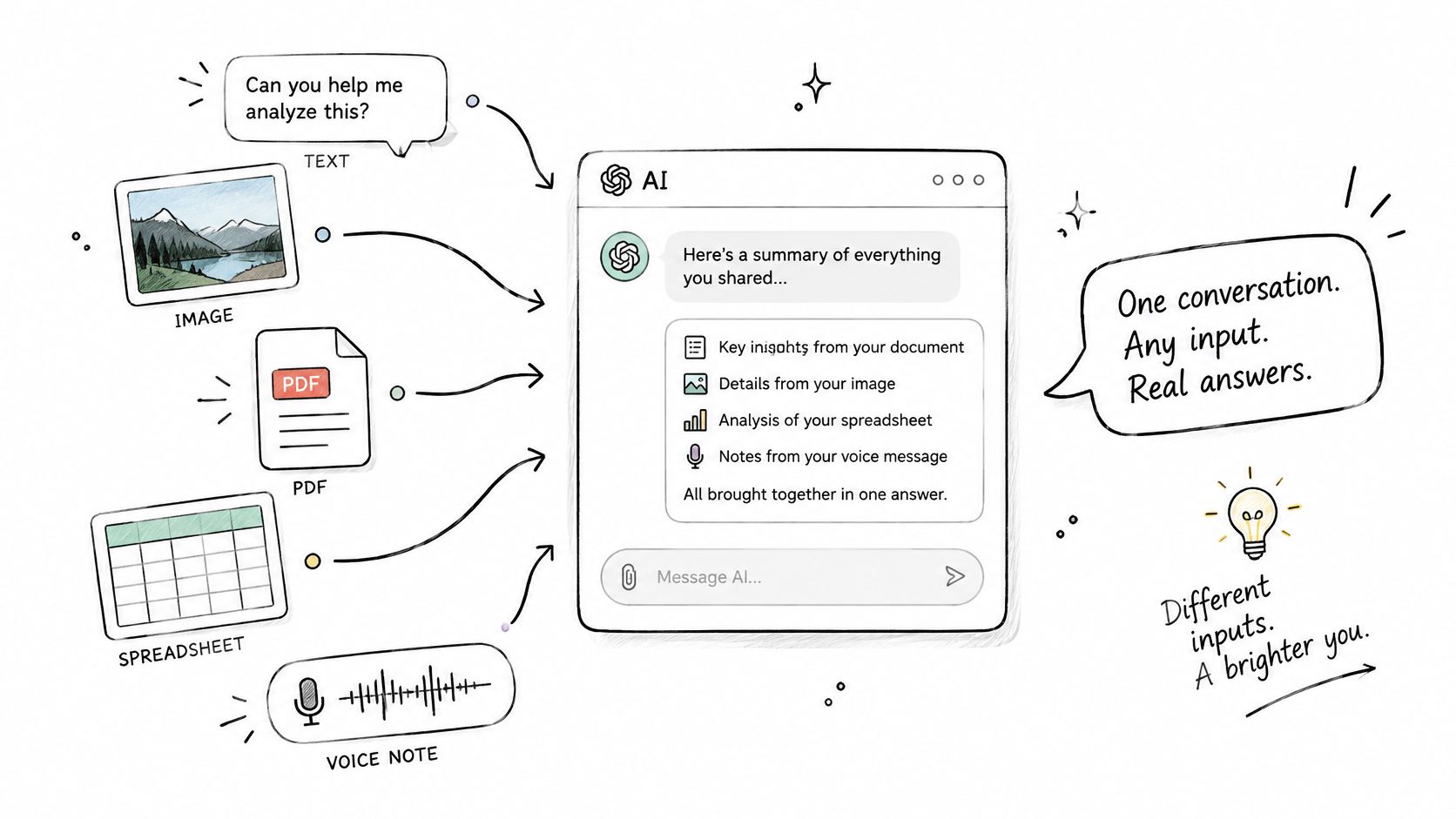
A multimodal AI app accepts more than one kind of input, such as typed text, photos, PDFs, spreadsheets and voice notes, and answers them inside one conversation instead of sending each kind to a separate tool. That's the whole idea. The word modal just means a type of information, so multimodal means several types at once.
Think of a single mode chatbot as a reader who only handles printed letters. Hand that reader a chart and they're stuck, because the chart isn't a letter. A multimodal app works more like a colleague at your desk who can read the letter, study the chart attached to it, listen to your voice memo about both, and then write one summary that draws on all three.
A Student Afternoon as a Worked Example
Say a student photographs three lecture slides, uploads a PDF of reading notes, and types a question in the same thread. The app doesn't treat those as three unrelated jobs. It reads the diagram on slide two, finds the matching explanation on page four of the notes, and answers in a way that points to both places. The student can then flip to that slide and that page to confirm the answer matches.
That last step matters more than the cleverness. There are two directions to keep straight. Input is what you give the app, whether that's a question, a photo or a file. Output is what it hands back, which can be text, a table, an extracted list or a generated image. Confusing the two leads people to assume that because an app accepted a file, it understood every part of it. Accepting and understanding aren't the same thing.
The market around this idea is growing fast, which partly explains why so many tools now claim the label. The Research and Markets multimodal AI report valued the global multimodal AI market at USD 1.6 billion in 2024 and projects it to reach USD 27 billion by 2034. A projection that large tells you vendors will keep adding file and image support. It doesn't tell you whether any one app reads your files accurately.
A multimodal app earns its place only when you can check its answer against the original file in under a minute.
What follows breaks that idea into parts you can test yourself: the input types and what each one risks, how one model combines them, where the answers go wrong, what to ask about privacy before you upload anything sensitive, and how to choose between options once you know your own file habits.
Input and Output Types It Handles
Scan this table first, then read the notes under it. Each row is a kind of input the app can read, and the final column shows what it typically hands back.
| Input type | Typical example | Returned output |
|---|---|---|
| Text | Notes, questions, drafts | Summaries, rewrites, answers |
| Images and photos | Screenshots, diagrams, handwritten notes | Descriptions, extracted text, edits |
| PDFs and Word files | Contracts, reports, research papers | Answers with page references |
| Spreadsheets | XLSX and CSV tables | Totals, trends, flagged rows |
| Audio and voice | Recordings, dictation | Transcripts and summaries |
| Video | Lectures, clips | Scene summaries with timestamps |
| Web sources | Live search results | Answers with linked sources |
A plain text question is the simplest case in the table. There's no layout to misread and no image to interpret, so the main risk is a vague question getting a vague answer. Everything below that first row adds a layer where meaning can get lost between your file and the model's reading of it.
The Two Rows That Cause the Most Trouble
A PDF is harder than it looks because layout carries meaning. A report might put a caveat in a footnote, split a table across two pages, or place a chart beside the paragraph that explains it. If the app extracts only the running text, the footnote can vanish and the chart becomes a caption with no numbers behind it. Page references in the output are your safeguard here, because they let you open the exact page and compare.
A spreadsheet has a different trap. It's useful when the app reads the actual cells and formulas in an XLSX or CSV file, because then a total can be recalculated from real values. It's far less reliable when you upload a screenshot of the grid, because now the app is reading a picture of numbers and can transpose digits or miss a hidden row. The same logic applies to scanned pages. A scan is an image until the app runs text recognition on it, and that recognition step can mangle columns before reasoning even starts.
Audio and video follow a similar pattern. A recording is usually converted into a transcript, and a video into frames plus timestamped notes, before the model reasons over either one. That conversion is where names get misheard and quiet asides disappear.
Practical rule: Upload the richest original format you have. Converting a scanned contract into plain text yourself can flatten the table structure your question depends on.
On the output side, generated visuals deserve the same scrutiny as generated text. If you're weighing which tool should create images inside your workflow, it helps to compare AI image generators on the styles and controls you need rather than assuming every app's image output is equal. The connecting idea across every row is shared context. A multimodal AI app can compare an invoice photo against a payment spreadsheet only when both files sit in the same conversation, so keep related materials in one thread instead of scattering them across chats.
How One Model Combines Text, Images and Files
Two designs sit behind most apps you'll try, and they fail in different places. Knowing which one you're using tells you where to aim your checks.
The Older Pipeline Works Like a Relay
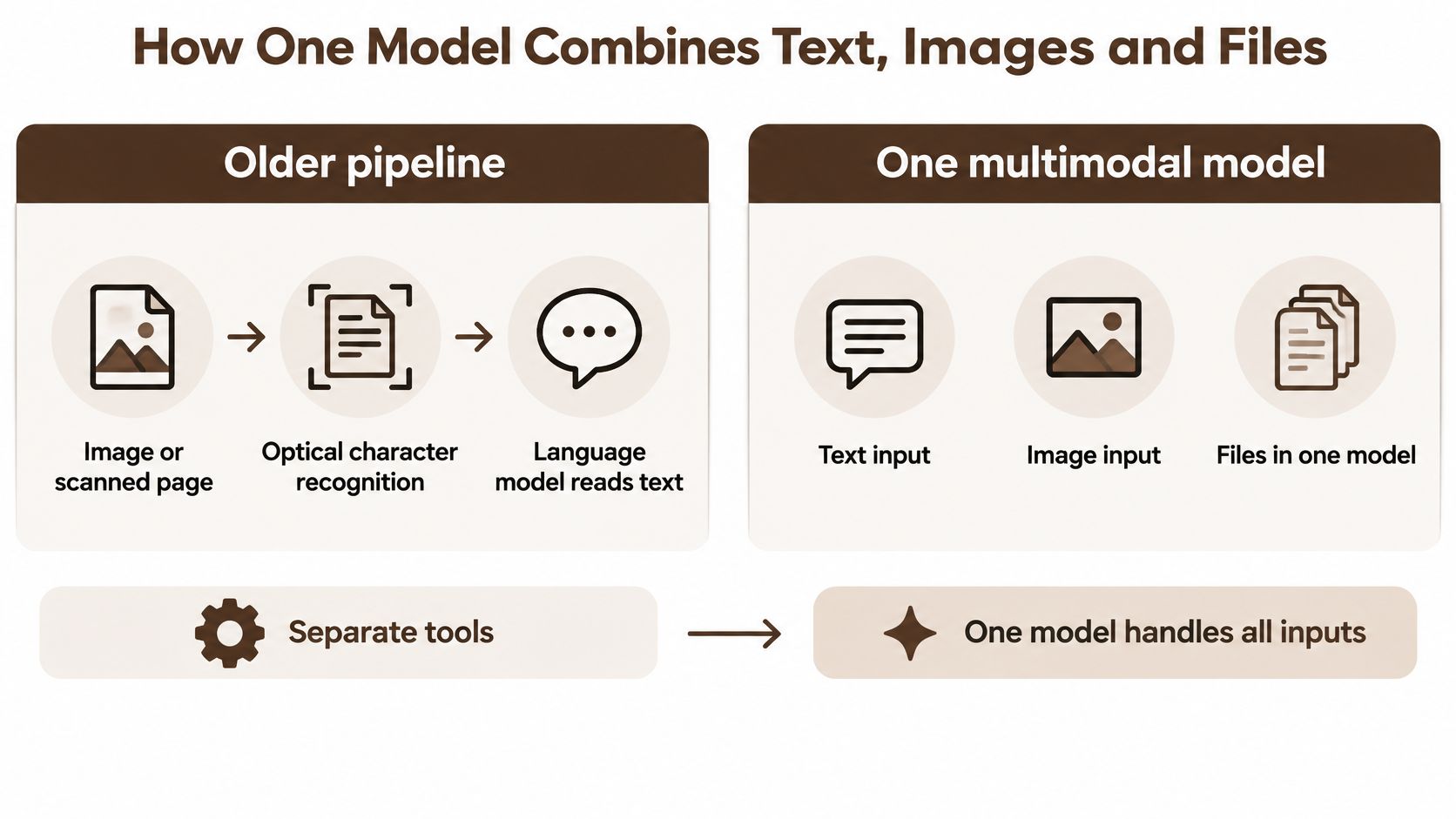
In the older design, separate tools handle each format in sequence. Optical character recognition, usually shortened to OCR, turns an image or scanned page into text. A language model then reads that extracted text and answers. Think of it as a relay race where each specialist runs one leg and passes notes to the next runner.
Relays have a known weakness. Whatever the first runner drops never reaches the second. If OCR merges two table columns into one line, the language model downstream has no way to know the columns were ever separate. It reasons fluently over damaged input and produces a confident answer built on a layout error it can't see.
One Model Reads the Whole Page at Once
In a natively multimodal design, one model is trained to take several media in the same context. The photo, its caption and your question are read together, more like one reader who sees the whole page at once instead of hearing about it secondhand. Spatial clues survive longer in this design because the model can use where things sit on the page, not just the words that were extracted from it.
Google's Gemini is the reference point for this shift. According to Google Research's 2023 year in review, Gemini launched in December 2023 as a model designed from the beginning to work across text, audio, images and video rather than treating each medium as a separate system. Google reported that Gemini Ultra exceeded state of the art performance on 30 of 32 widely used academic benchmarks, achieved 90.04% on the Massive Multitask Language Understanding benchmark, and scored 59.4% on the newer Massive Multimodal Multitask Understanding benchmark.
Read those numbers for what they are. They're results on research tests with known questions and clean materials, not measurements of your scanned contracts or your lecturer's handwriting. The launch matters historically because it showed one general purpose model could combine written prompts, visual material, audio, video, code and mathematical content in a single reasoning process. Many current apps follow that approach for exactly that reason. It isn't a promise that your particular file will be read correctly.
Neither design removes your job as checker. The relay design loses information at the handoffs. The single model design keeps more context but can still misjudge a chart or overlook a footnote buried on page thirty. So ask one direct question of any app you're evaluating.
Does this app keep the original page and its layout, or only the extracted text?
The answer decides how much of your source survives into the answer. If only extracted text survives, treat every claim about tables, charts and page structure as unverified until you've compared it with the rendered original.
Document and Research Work That Benefits Most
Start where the payoff is concrete. A supplier sends a contract as a PDF, three invoices as scans, and you hold the payment record in a spreadsheet. Checking whether you have paid the same invoice twice means cross referencing all of it, and that's exactly the shape of task a multimodal workspace handles well.
BromeAI lets one question cover every uploaded file at once, so the contract, its invoices and the payment spreadsheet can be checked in a single thread. You can see how that works in practice on our document analysis feature page. Four tasks show the pattern clearly, each with a different kind of output to verify.
- Contract review: The app flags risky clauses and gives the page reference for each one, so you open that page and read the clause in context before worrying about it.
- Duplicate invoice check: Invoice numbers and amounts from the scanned files are compared against the payment spreadsheet, and any number that appears twice gets listed for you to inspect.
- Spreadsheet summary: Totals, trends and flagged rows come from the cells and formulas themselves, which means you can recalculate one total by hand to confirm the rest.
- Research brief: Web sources are gathered and returned with a link attached to each claim, so an unsupported statement stands out immediately.
Why One Thread Beats Four Tools
A student, analyst or small team often touches a PDF, a screenshot and a table in the same week. Moving figures between separate tools by copying and pasting introduces its own errors, and you lose track of which number came from which file. One workspace keeps the sources and the answers side by side. The same thread can also accept new files as they arrive, so it becomes a running record of the project rather than a pile of disconnected chats.
Some of this work runs longer than a single question. Agentic AI carries out multi step work on its own, including searching the web, reading sources and generating images, then reports back once every task is done. If you're comparing tools built specifically for that research heavy end of the work, you can find AI research assistants reviewed side by side and match their strengths against the tasks above.
Adoption figures explain why vendors keep building these combined workspaces. In McKinsey's global survey conducted from February 22 to March 5, 2024, 65% of respondents said their organizations used generative AI in at least one business function, and 40% reported using it in more than two business functions. Work spread across that many functions rarely stays in one file format, which is why document and research tasks benefit first.
Where Multimodal Apps Go Wrong and How to Check
The most common failure is also the easiest to miss. The app reads a chart, describes a trend in smooth confident language, and gets the direction wrong because it misread which axis was which. A plain text chatbot can't make that mistake because it never saw a chart. Multimodal apps fail in extra ways precisely because they take in extra kinds of input.
Benchmark evidence puts a scale on that risk. A benchmark summarized in recent multimodal model research reports a 93% human accuracy rate versus 63.0% for top models on chart questions, with visual reasoning heavy items producing performance drops of 35% to 55%. The same work notes that extracting text first and reasoning second can lose spatial relationships and graphical encodings, which is the relay problem showing up in measured results. A long document compounds it. The MMLONGBENCH-DOC benchmark covers 1,082 expert annotated questions across 135 lengthy PDF documents averaging 47.5 pages, and the best reported system achieved only a 44.9% F1 score. Length plus mixed text, images and tables gives a model many places to miss a footnote or misread a column.
| Failure mode | Warning sign | Check before you act |
|---|---|---|
| Chart misreading | Trend answers that contradict the axis labels | Ask for exact values, then compare them with the chart |
| Lost table structure | Columns shifted or cells merged in the answer | Compare the extracted table with the original page |
| Missed footnotes | Answers that ignore an appendix or small print note | Ask for the page number behind each claim |
| Wrong totals | Sums that differ from the spreadsheet | Recalculate the total in the source file |
| Unsupported risk flags | A clause flagged with no quoted text | Open the cited clause and read it before acting |
Catching Each Failure in Practice
Chart misreading shows up first as a mismatch between words and axes. If the app says sales rose while the axis labels suggest the line tracks returns, stop and ask for the exact plotted values. Numbers are easier to compare against the chart than a verbal trend, and a model that invented the trend usually can't produce values that match the grid.
Lost table structure is quieter. The answer looks tidy, but a column of discounts has slid into the column of totals. Open the original page beside the extracted table and check one full row across. If one row aligns everywhere, the structure probably survived. If it doesn't, nothing computed from that table is safe.
Missed footnotes and unsupported risk flags share one fix. Demand a location for every claim. A contract risk finding should arrive with a page number and quoted wording, and our guide to AI fact checking habits walks through how to press for that evidence. A flag with no quote is an opinion, not a finding.
Wrong totals get the simplest check of all. Recalculate the sum in the source spreadsheet. If the app read the cells correctly, your number and its number will match to the cent.
Before trusting any new app: Run it on a file where you already know the answer, such as an invoice with a known total, and see whether it lands on your figure.
That single test tells you more than any feature list. For high impact outputs, hold a firm rule. A financial total or a contract risk should always come with a visible source location and a quick recalculation or reread on your side. A clean looking answer isn't proof of accuracy, and a two minute check is far cheaper than a wrong figure in a report someone else relies on.
Privacy Questions to Ask Before Uploading Files
After the first impressive demo, many users ask the same question: What happens to the files I just uploaded? It's the right question, because a multimodal app may send your text, images, and documents to one or more model providers to get an answer back. A privacy policy that only describes the app itself, and says nothing about those providers, leaves the most important part of the chain undocumented.
The legal backdrop gives you specific things to look for. CNIL, France's data protection authority, identifies the GDPR right to erasure as Article 17 and explains that it can require deletion in specified circumstances. CNIL also notes that exercising rights over training datasets can raise problems comparable to those involving other large datasets, while exercising the same rights over an AI model creates additional technical difficulties. That's why claims about deletion and training need to be explicit operational arrangements, not vague assurances.
Claims to Verify Rather Than Assume
Treat vendor statements, ours included, as claims to check against a written policy. We're a French company with EU hosting, our service is GDPR compliant, we have zero data retention agreements with every AI model provider we work with, and we don't use users' conversations or files for AI training. You can read the full wording on our privacy policy page and judge whether it answers the questions below.
Each claim settles something specific and leaves something else open. Zero retention agreements address whether providers keep your data after processing. Exclusion from training addresses whether your files improve future models. Neither claim on its own explains how deletion works for data a provider has already processed, or how long backups persist, so a careful reader keeps asking until those points are covered.
Put four questions to any vendor before uploading a contract, invoice or anything with personal data in it.
- Where is the data hosted: Which country or region holds your files and conversations at rest?
- Who processes it: Which model providers receive your content when you ask a question?
- Is it kept: Do retention agreements prevent those providers from storing or training on it?
- Can I delete it myself: Is there a control in your profile that removes your data without a support ticket?
A vendor who answers all four in writing has given you something you can hold them to. A vendor who answers with general language about taking privacy seriously hasn't.
Choose the Right Multimodal AI App for Your Work
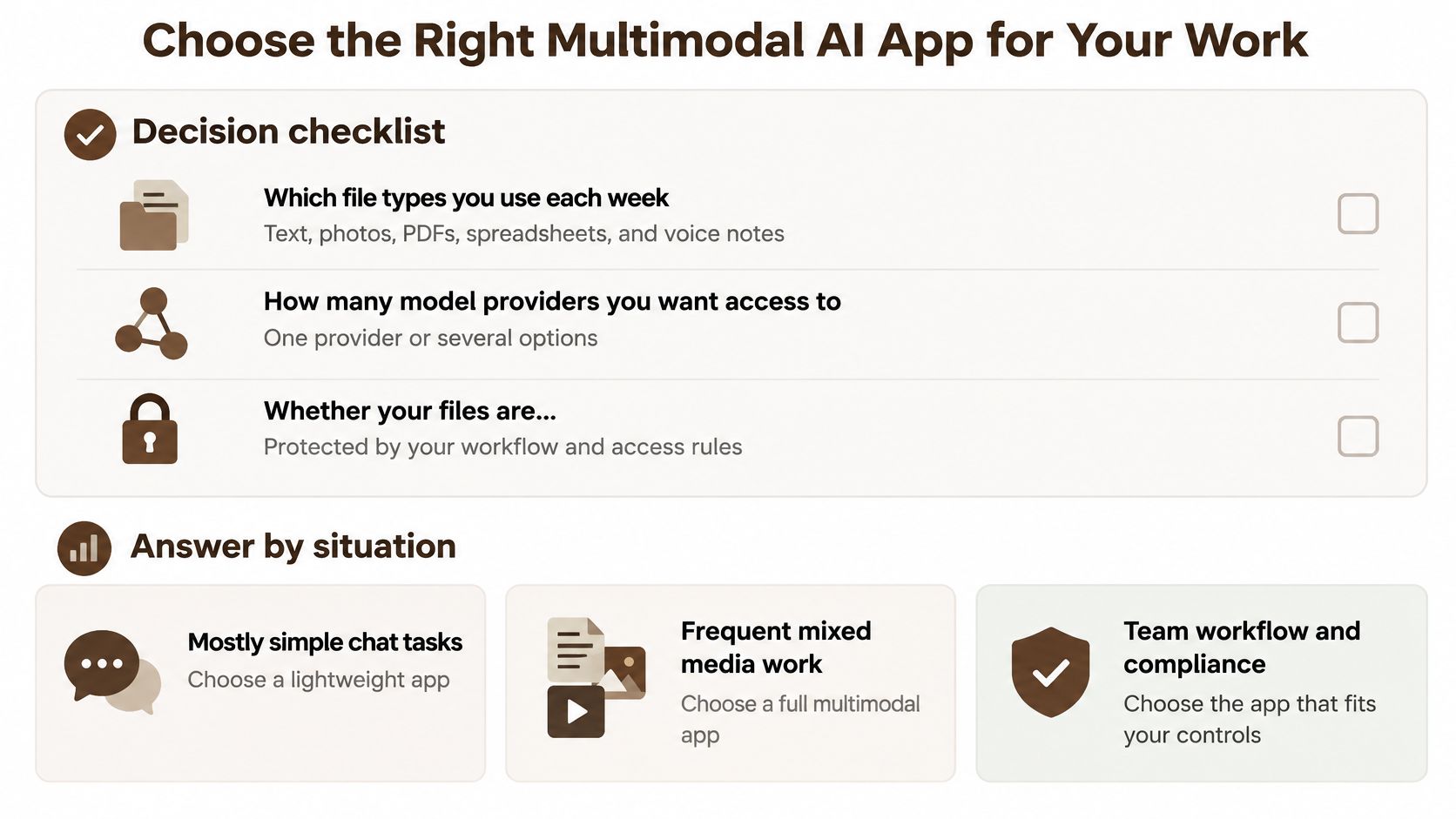
Start with your own week, not a feature comparison page. The right app depends on the files you handle, how many models you want access to, whether those files are sensitive, and what you already pay for AI tools.
Settle These Questions First
- Which file types you use each week: Mostly typed questions point to a lightweight app, while regular PDFs, spreadsheets and photos point to a full multimodal AI app.
- How many model providers you want access to: One trusted provider may be enough, or you may want several because different models handle charts, code and long documents differently.
- Whether your files are sensitive: Contracts and invoices raise the privacy bar from the previous checklist, while lecture slides rarely do.
- What you already pay: Add up your current AI subscriptions before comparing any combined plan against them.
Model choice deserves a closer look because it affects answer quality day to day. Automatic routing sends each question to the AI model best suited to it, which saves you from guessing which model handles a chart or a long PDF better. You're not locked into that choice, since you can override it at any point by picking a model in the picker, even mid conversation. BromeAI brings ChatGPT, Claude, Gemini, Mistral and other AI models together in one European platform, so that picker covers several providers without separate accounts for each.
What the Cost Comparison Really Says
| Option | Monthly cost | Billing |
|---|---|---|
| Five separate AI subscriptions | about 88 € | one bill per provider |
| Brome Plus | 24.90 € | single invoice covering the same range of models |
Five separate AI subscriptions cost about 88 € per month, while Brome Plus costs 24.90 € for the same range of models on a single invoice. That comparison only holds if you genuinely use several models. If your work needs one model and nothing else, compare that provider's single plan instead and the combined option may not win. Honest arithmetic beats a headline saving.
End with a test you can run this week. Pick three real files from your own work, ideally one with a total you can recalculate and one with a clause or footnote that matters. Ask the same question in automatic mode and with a manually picked model, then check one answer against its source page or cell. The app that survives that test on your files is the right one, whatever its marketing says.
Bring your three test files to BromeAI and run them in one conversation, with automatic routing choosing the model or the picker letting you choose it yourself. Your contracts, invoices and spreadsheets stay out of model training under zero data retention agreements with every provider, so you can check real work instead of dummy examples. Start with the invoice total you already know, confirm the answer against your spreadsheet, and decide from evidence rather than promises.